Costs
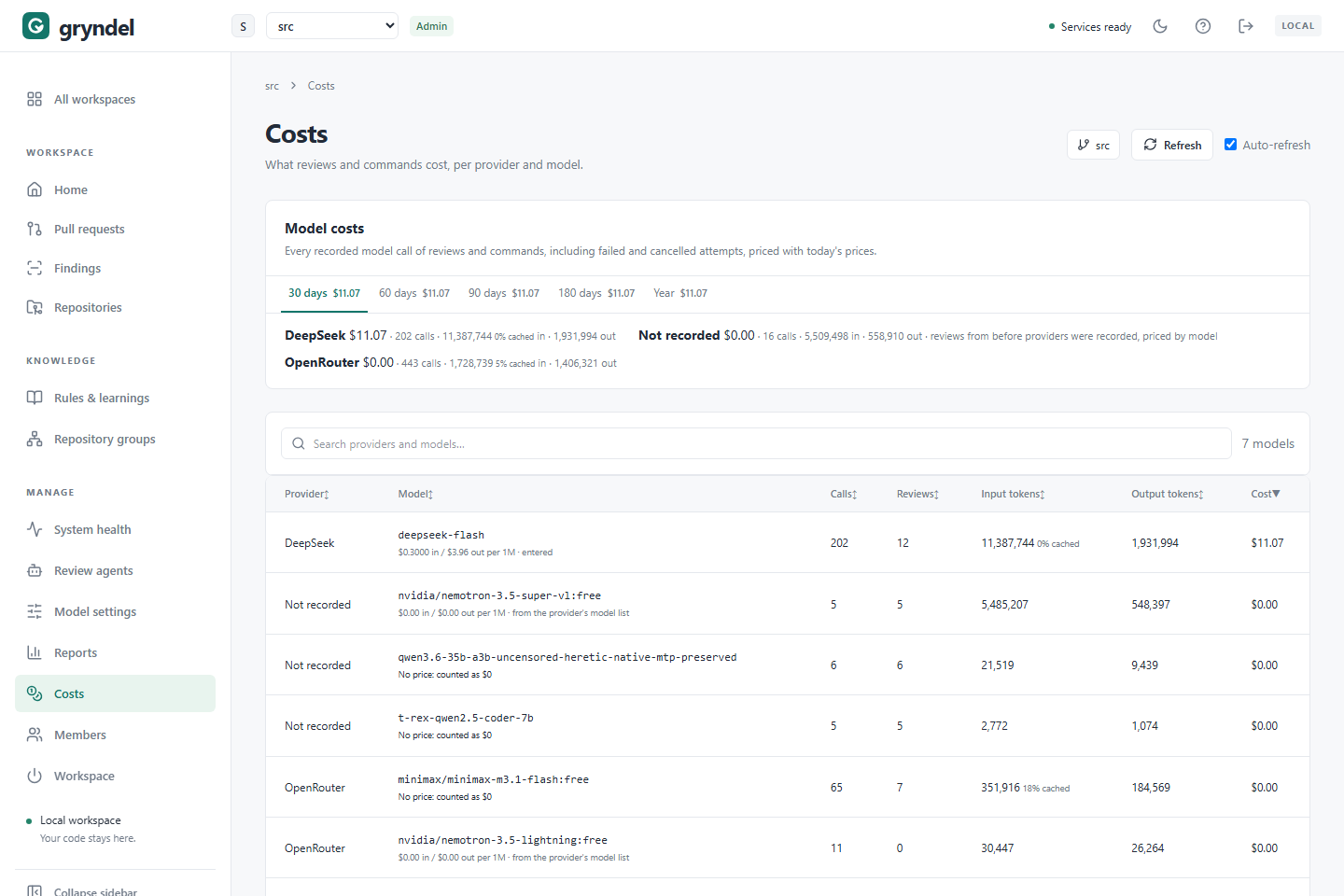
The Costs page shows what your workspace has spent on models, per provider and per model. Use it to keep an eye on spending, to find what is expensive, and to check the effect of a change such as a cheaper model. This page explains how to read the numbers, how to trace a cost back to its reviews, and practical ways to spend less.
Open the page
In the sidebar, under MANAGE, click Costs. Everyone in the workspace can see it. Prices are set by workspace admins in Model settings.
What is counted
Every recorded model call made for reviews and @gryndel commands, including calls of review
attempts that failed or were cancelled: you paid for those too.
- Costs are worked out when you open the page, from today's prices. A price you enter now also applies to earlier usage.
- A model with no price counts as $0. Its row says No price: counted as $0 in red.
- A call cut off before the provider reported its usage, for example one cancelled while it was running, can't be counted.
The page is only as right as your prices. Before you rely on a total, check that no model you pay for says No price.
Read the numbers
Periods
The tabs at the top are 30 days, 60 days, 90 days, 180 days and Year. Each tab shows its total cost, so you can compare them at a glance. Click one to see its details.
Under the tabs, each provider is listed with its cost, number of calls, and input and output tokens. Tokens are the units models count text in. Input is what Gryndel sent (code, instructions and the diff); output is what the model wrote back.
The model table
| Column | What it shows |
|---|---|
| Provider | The provider the calls went to. |
| Model | The model, and the price used for it. |
| Calls | Model calls in the period. One review usually makes several. |
| Reviews | How many reviews used the model. |
| Input tokens | Tokens sent, with the share the provider served from its prompt cache, if any (for example 40% cached). |
| Output tokens | Tokens the model wrote. |
| Cost | Cost in US dollars. Small amounts show four decimals. |
The table starts with the most expensive model. Click a column heading to sort by it, or type in Search providers and models.
Under each model you see where its price comes from:
| Label | Meaning |
|---|---|
| entered | Someone set it in Model settings. |
| from the provider's model list | OpenRouter, Cheaper Inference or Together AI publishes it. |
| No price: counted as $0 | Nobody has priced this model. Fine for a server you run yourself; wrong for a paid provider. |
A provider listed as Not recorded holds reviews from before Gryndel recorded providers; those are priced by model name.
Quick sums worth doing
- Cost per review for a model: Cost ÷ Reviews. Compare models on this, not on total cost, because they may review different amounts.
- Calls per review: Calls ÷ Reviews. Single pass makes about one; Verified and Agents make many more.
- Input versus output: input usually dominates, because each call resends the code. A model with cheap input often costs less overall than its output price suggests.
Find what is expensive
The Costs page shows which model costs most. To find which repositories and reviews, go to Pull requests:
- Click the Cost heading to sort by it; click again to reverse the order. (On a narrow screen the Cost column is hidden.)
- Use the All repositories menu to compare one repository with another.
- Open an expensive review. Its details show:
- Cost, expandable: each step (drafts, agents, verification and so on) with its calls, tokens, provider, model and cost;
- Change profile: the size of the change, an Estimate of what it should cost, and the Actual cost. For repositories set to Don't keep code, the estimate says Not available.
Typical causes:
| You see | Likely cause |
|---|---|
| A few reviews with huge input | Very large merge requests (GitLab) or pull requests (GitHub), or generated, vendored or lock files in the change |
| Many reviews on the same merge or pull request | Lots of small pushes, each reviewed on its own |
| Most of the cost in agent steps | Many agents run on each change, on an expensive model |
| Many attempts on a review | Retries after errors, each attempt paying again for calls that hadn't finished |
| Cost on a model you didn't expect | An agent set to its own provider and model on Review agents |
Cut costs
Start with the change that fits your problem from the table above. Then compare the 30 days total, or cost per review, a week or two later.
| Change | Where | Saving | Trade-off |
|---|---|---|---|
Exclude generated, vendored and lock files (for example vendor/**, **/*.lock) | Repository Scope tab: Excluded paths | Less input on every call | None, if nobody needs those reviewed |
| Lower Max context chars | Repository Scope tab | Caps the code sent per review | Files that don't fit are left out |
| Use Single pass for low-risk repositories | Repository Reviews tab: Review mode | Biggest cut: one call instead of several drafts plus verification | More false alarms |
| Limit which agents run | Repository Reviews tab: Review agents, or disable agents on Review agents | Fewer agent calls | Less specialist coverage |
| Run agents on a cheaper model, keep a strong default | Review agents and Model settings | Agent calls are most of an agent review | Watch agent Efficiency |
| Switch to a cheaper model or provider | Model settings | Lower price per token | Check review quality first |
| Pause reviews on a busy repository, or on one merge or pull request | Repository Reviews tab: Review processing, or @gryndel pause | No automatic reviews | You must ask with @gryndel review |
Also:
- Prompt caching is requested automatically where the provider supports it. Verified and
agent reviews resend the same code, so a high
% cachedshare on a provider that discounts cached tokens saves real money. Enter its Cache read price so the page shows it. - Fix failing reviews. Failed attempts cost money and produce nothing. Check the Failures list on Reports.
- Price every paid model, so an unpriced model doesn't hide most of your spending.
See Repositories for the repository settings, and How settings combine to set them once for every repository.
Related pages
- Model settings: providers, models and prices.
- Pull requests: the cost of each review, step by step.
- Reports: what you get for the money, such as how many findings people act on.
- All workspaces: costs across workspaces.