Findings
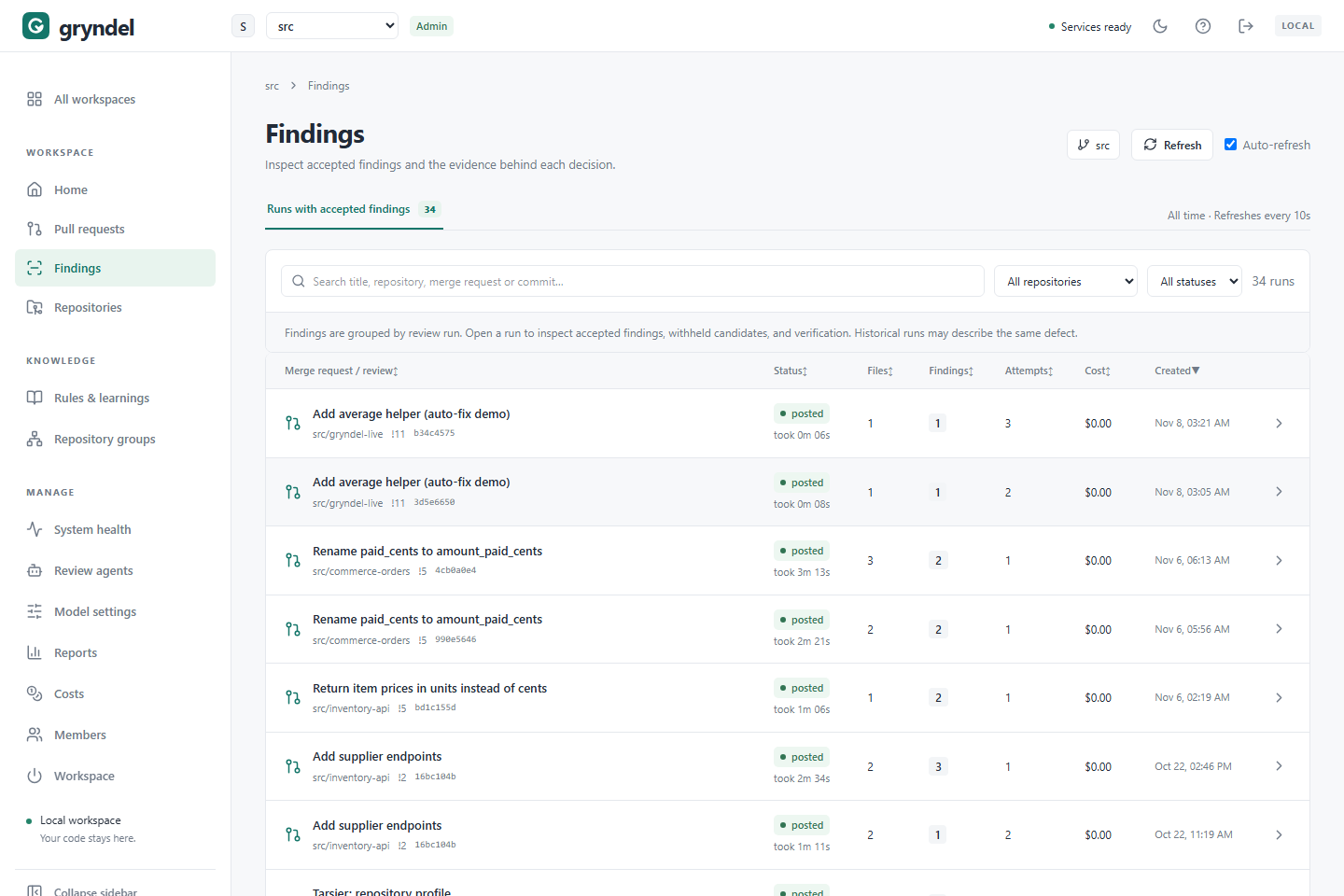
A finding is a problem Gryndel posted on a merge request (GitLab) or pull request (GitHub), such as a bug, a security hole or a broken team rule. The Findings page lists only the review runs that posted at least one finding, so you can go straight to the reviews that found something. Use it to triage what Gryndel is reporting, to look into one finding in depth, and to understand why something was, or wasn't, posted. Everyone in the workspace can use it.
When to use this page
| You want to… | Go to |
|---|---|
| See what Gryndel found across the workspace, or in one repository | This page |
| Find the review of one merge or pull request, whatever its result | Pull requests |
| Respond to a finding: fix it, apply its suggestion, dismiss it | The merge or pull request in GitLab or GitHub (see Respond to a finding) |
| See what people did with findings, and how useful they were | Reports |
How the page is organised
Where: in the sidebar, under WORKSPACE, click Findings.
Each row is one review run, not one finding. The count above the list, Runs with accepted findings, is how many runs posted at least one finding.
The list works like the Pull requests list: the same columns, the same search box, the All repositories and All statuses filters, sorting and pages. Runs that posted nothing are left out.
The same problem often appears in several rows. When someone pushes a new commit, Gryndel reviews the merge or pull request again and may report the same problem again. Older runs keep their findings as history. Look at the newest run of a merge or pull request for its current state.
Triage what Gryndel found
When: a daily or weekly look at what reviews are reporting, or before a release.
- Click Findings in the sidebar.
- To focus on one repository, pick it in All repositories.
- Click the Findings column heading (twice, for the most first) to see the runs with the most findings at the top. Or sort by Created to see the newest first.
- Open a run, read its findings, and skip runs marked as superseded by a newer commit.
Every filter is kept in the page address, so you can bookmark a view such as "findings in
payments-api".
Look at one review's findings
-
Find the run with the search box. You can search by title, repository, number (
!12on GitLab,#12on GitHub) or commit. -
Click its title, or the arrow at the end of the row. REVIEW DETAILS opens on the Findings tab.
-
Each card shows:
Part Meaning Severity P0is critical (a security hole or data loss),P1is realistic incorrect behaviour,P2is a minor but real issue.Label (Agents mode only) issue,suggestion,nitpickorquestion. Only issues can fail the commit status.Category logic,security,reliability,conventionwhen it breaks one of your rules or guideline files, orcross-repowhen it breaks another repository of the same group.Title, file and line Where the problem is, on an added or deleted line. Explanation Why it's a problem. Suggested fix Replacement code, if the fix was clear. Apply it from the comment in GitLab (Apply suggestion) or GitHub (Commit suggestion). Rule The rule the finding is based on. Found by The review agents that found it. -
Open Verification to read how the verifier judged each finding: the reasoning, and the Trigger, Expected and Actual behaviour. This is the quickest way to tell whether a finding is real.
-
Open Withheld to see candidates Gryndel didn't post.
Findings, Withheld and Verification explains every part of the review details.
New repositories use Don't keep code by default. Then Gryndel keeps only each finding's title and location, and the explanation, verification and withheld candidates are only in the merge or pull request's comments. Click View in GitLab (or View in GitHub) to read them.
Which findings fail the merge or pull request
Each review sets a commit status on the merge or pull request's latest commit (on GitHub it
is the gryndel/review status check). It fails when at least one finding
is at or above the repository's Fail commit status on threshold (by default, only P0),
or when the review was only partial. In Agents mode, only issue findings count; suggestions,
nitpicks and questions never fail it. See The commit status.
Why was a finding withheld?
Gryndel proposes more candidates than it posts. Before posting, it checks each one, and anything that doesn't pass goes to the Withheld tab with a reason.
| Reason | What happened | Should you worry? |
|---|---|---|
verification rejected | A second model pass checked it against the code and judged it rejected or uncertain. The detail says why. | Usually not. On a high-risk change, skim them: the verifier can be wrong. |
severity policy | It was less severe than Min. severity to publish. | No. That's your repository's setting. |
comment level | It was a suggestion, nitpick or question over the Comment level limit, or past the most findings one review posts, or past the most candidates one review verifies. | No, unless you want more comments. |
dismissed | Someone replied @gryndel ignore this to it earlier on this merge or pull request. | No. |
duplicate | Another finding already describes it. | No. |
unknown file / invalid anchor | It pointed at a file or line that isn't in the change. | Only if it's common; the model may be struggling with large changes. |
If a real problem keeps getting withheld: for severity policy, lower Min. severity to
publish; for comment level, raise the Comment level; for verification rejected,
read the verifier's reasoning. If it misunderstood a convention, a rule explaining
it helps both passes. These settings are on the repository's
Findings tab.
Why didn't Gryndel report a problem I know about?
| Possible cause | How to check |
|---|---|
| It was found but withheld | Look in the Withheld tab of that run. |
| The file was left out | Size in the change profile says how many files were left out at intake, and Files shows +N in the list. |
| It isn't a bug | Out of the box Gryndel reports real defects, not style, tests or team policy. Add a rule for those. |
| It's outside the changed lines | Gryndel comments on lines the merge or pull request changes. |
| The model missed it | Check Review confidence. Consider a stronger model, or Verified or Agents mode; see Repositories. |
Respond to a finding
You respond in GitLab or GitHub, not here. On the merge or pull request:
- Fix the code and resolve the thread, or click Apply suggestion (GitLab) or Commit suggestion (GitHub).
- Reply
@gryndel explainin the thread for a deeper explanation. - Reply
@gryndel ignore thisin the thread if it's wrong or doesn't matter here. It won't be raised again on that merge or pull request. - Comment
@gryndel checkafter pushing fixes. Gryndel re-checks its open threads and resolves the fixed ones.
Commands need the Developer role or higher in GitLab, or write access to the repository
in GitHub. On GitHub, type @gryndel in full: it's a word Gryndel watches for, not a user
GitHub can suggest or notify.
What people do is counted on Reports. See Respond to a finding.
Things to keep in mind
- A missing finding isn't proof of a fix. If a newer review doesn't repeat a problem,
the model may simply not have raised it again. Check the code, or use
@gryndel check. - This page shows what Gryndel posted, not what happened next. Whether a finding was resolved or dismissed is in GitLab or GitHub and on Reports.
- "No publishable findings" isn't a clean bill of health. It means nothing passed the checks, not that the change is free of defects.
Get fewer or more findings
What a review posts depends on the repository's Review mode, Comment level and Min. severity to publish. Change these on Repositories. To teach Gryndel what your team cares about, add rules.