Reports
The Reports page shows how your workspace uses Gryndel and, above all, what people do with its findings. A finding is one problem Gryndel posted on a merge request (GitLab) or pull request (GitHub). Gryndel reads each finding's thread back from GitLab or GitHub to see whether people fixed it, dismissed it, or left it alone. Use this page to judge whether Gryndel is worth it, and to find the agents, repositories or kinds of finding that need tuning. Costs are on the separate Costs page.
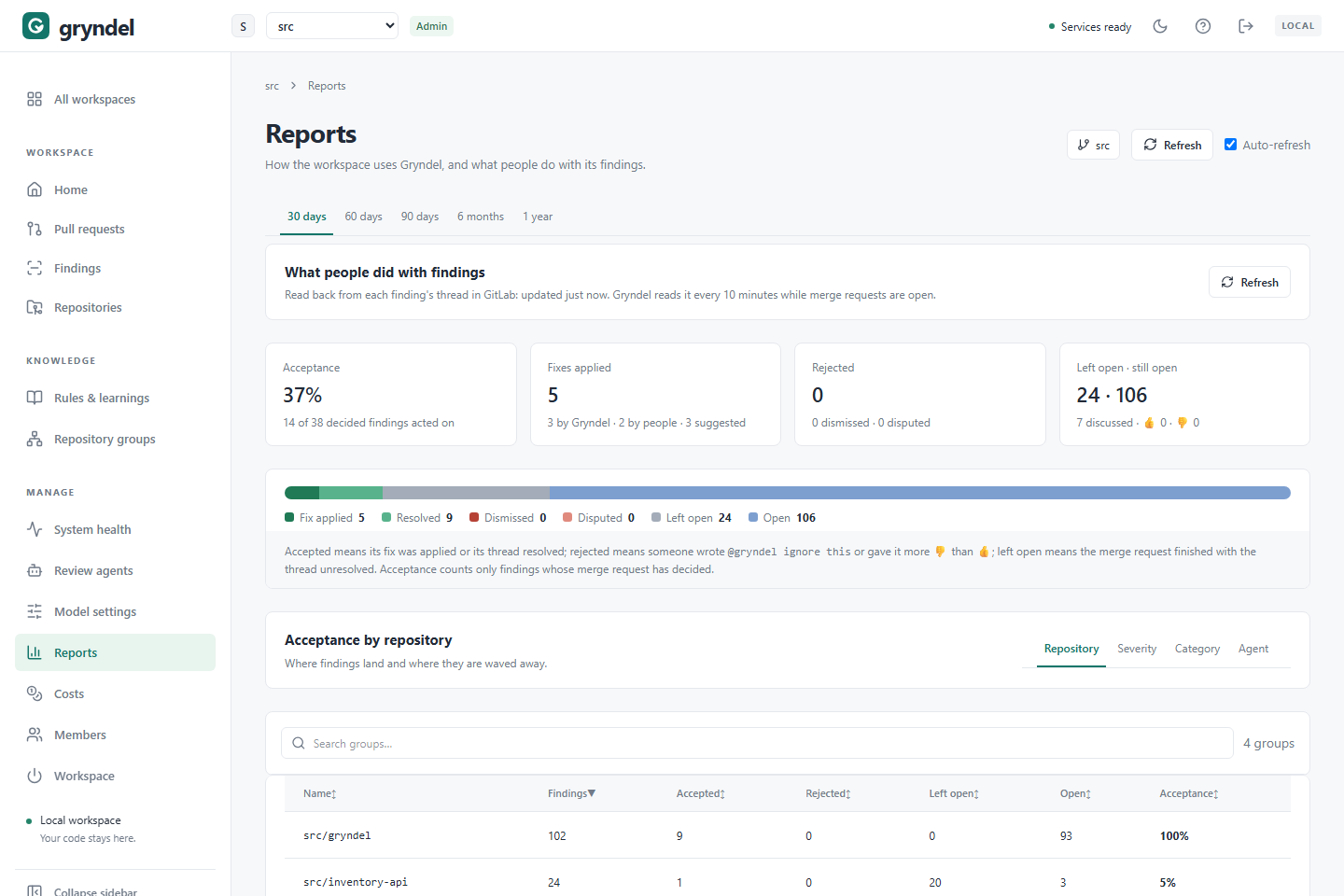
Open the page
In the sidebar, under MANAGE, click Reports. Everyone in the workspace can see it.
The tabs at the top choose the period: 30 days, 60 days, 90 days, 6 months or 1 year. Every section follows it. Findings belong to the period they were posted in; reviews to the period they were created in.
Start with 90 days once you have a few weeks of history. Thirty days of a quiet repository can be too few findings to judge.
How outcomes are collected
Gryndel doesn't ask anyone to rate findings. It reads what people already do in GitLab or GitHub:
- whether the finding's thread was resolved, and by whom;
- whether its suggested fix was applied (GitLab only; see the note below);
- replies from people, and 👍 and 👎 on the finding comment;
- whether someone wrote
@gryndel ignore thisin the thread; - whether the merge or pull request is open, merged or closed.
GitHub doesn't tell Gryndel whether someone committed a finding's suggestion with Commit
suggestion, so on GitHub no finding is counted as Fix applied. A committed suggestion
counts as Resolved once its conversation is resolved, so ask your team to resolve the
conversation after committing (or comment @gryndel check). Gryndel never commits fixes
itself on GitHub, so Applied by Gryndel stays at 0 there too.
When it updates:
- Gryndel reads the threads about every 10 minutes, up to 100 merge or pull requests at a time, oldest-read first. In a busy workspace, it can take a few rounds to read everything.
- Once a merge or pull request is merged or closed, its threads are read one last time, then never again. Reactions or replies added after that don't change the report.
- A finding appears on this page only after its thread has been read once, so a review that just finished may take up to ten minutes to show up.
The What people did with findings section says when the threads were last read, for example updated 4m ago, or not read yet.
To read them now, click Refresh. The button says Reading GitLab… (or Reading GitHub…) while it works. Anyone in the workspace can use it. Clicking again within 30 seconds of a successful read does nothing new.
If the code host couldn't be read, the section shows a message such as "GitLab could not be read; outcomes may be stale." (or "GitHub could not be read…"). The figures are then from the last successful read. Check that Gryndel still has access to the repositories, then click Refresh:
- GitLab: the Gryndel service account must still be a member of the group or projects.
- GitHub: Gryndel's GitHub App must still be installed on the account, with the repositories selected in its installation.
What happens to a finding
Each posted finding gets one outcome. When several apply, the first in this table wins: a finding someone dismissed counts as Dismissed even if its thread was later resolved.
| Outcome | Meaning | Counts as |
|---|---|---|
| Dismissed | Someone wrote @gryndel ignore this in the thread. | Rejected |
| Disputed | The finding got more 👎 than 👍. | Rejected |
| Fix applied | Its suggested fix was applied, by a person or by Gryndel. GitLab only. | Accepted |
| Resolved | The thread was resolved, by a person or by Gryndel (@gryndel check or @gryndel resolve). | Accepted |
| Left open | The merge or pull request was merged or closed with the thread unresolved. | Decided, not accepted |
| Open | The merge or pull request is still open. | Not decided yet |
To learn how people respond to findings, see Reading a review.
What each number means
Acceptance
Acceptance = accepted ÷ (accepted + rejected + left open)
It's the share of decided findings that someone acted on. Findings on merge or pull requests that are still open aren't part of it yet, so acceptance for a recent period can move as they finish. A — means nothing has been decided yet.
The summary cards
| Card | What it shows |
|---|---|
| Acceptance | The acceptance rate, and "N of M decided findings acted on". |
| Fixes applied | Fixes applied, split into by Gryndel and by people, and how many findings carried a suggested fix. |
| Rejected | Rejected findings, split into dismissed and disputed. |
| Left open · still open | Both counts, plus how many findings people replied to, and their 👍 and 👎 totals. |
Under the cards, a bar shows the share of each outcome, with a legend. Hover over a part for its count.
Acceptance by repository, severity, category or agent
This table shows where findings land and where they're waved away. Use the tabs Repository, Severity, Category and Agent to group the findings. Each row shows Findings, Accepted, Rejected, Left open, Open and Acceptance. It starts with the group that has the most findings; click Acceptance to sort by it.
- Severity is P0 (critical: security or data loss), P1 (realistic wrong behaviour) or P2 (a minor real issue).
- Category is
logic,security,reliability,conventionorcross-repo. Convention findings come from your rules. - Agent only covers reviews in Agents mode. A finding raised by two agents counts for both.
Who opens the most reviewed merge requests, and the busiest repositories
This table shows where Gryndel's reviews go. Use its tabs:
- People lists each person by who opened the merge or pull request (their GitLab username or GitHub login). Only workspace admins see this tab, because per-person figures can read like performance tracking. Use it to see who relies on Gryndel most, and whose findings are accepted or waved away; low acceptance for one person often means findings that don't suit their part of the code, not a problem with them.
- Repositories (Projects on GitLab) lists each repository. Everyone can see it.
Each row shows Reviews, Merge requests (Pull requests on GitHub), Findings, Accepted, Rejected, Left open, Acceptance and Model tokens. It starts with the busiest; click a column to sort by it.
Gryndel records who opened each merge or pull request when it reviews it. For reviews from before it did, it looks the author up in the background, about 100 merge or pull requests every ten minutes, so older rows can show (unknown) for a while. A merge or pull request that no longer exists stays (unknown).
The findings list
The Findings table lists every posted finding in the period with its outcome. It shows titles and locations only. Click the arrow at the end of a row to open the finding in GitLab or GitHub. If there are more than 2,000, the newest 2,000 are shown.
| Column | What it shows |
|---|---|
| Finding | Title, file, repository and number (!12 or #12). |
| Severity | P0, P1 or P2. |
| Category | The kind of problem. |
| Outcome | One of the outcomes above. For resolved or applied findings, who did it. |
| Feedback | Replies, 👍 and 👎. |
| Posted | The date it was posted. |
Search findings matches the title, file, repository, number, severity, category,
outcome, agent, who resolved it and, for admins, who opened the merge or pull request. For example, type Disputed to list every disputed finding,
or an agent's name to read what it raised. Click Export CSV to download the list (with the
agents, merge or pull request state and, for admins, its author) for a spreadsheet.
Usage
The Usage section shows how much Gryndel did in the period:
| Card | What it shows |
|---|---|
| Reviews | Reviews created, how many were posted and how many failed, and on how many merge or pull requests. |
| Review time | The median time a posted review took, and the time 90% finished within. |
| Findings posted | Findings in posted reviews, and how many reviews found nothing. |
| Applied by Gryndel | Fixes Gryndel committed itself, in repositories set to Suggest and apply fixes, with skipped and failed attempts. GitLab only. |
Below the cards:
| List | What it shows |
|---|---|
| By severity | Findings posted per severity. |
| By category | Findings posted per category. |
| Held back by Gryndel | Findings Gryndel didn't post, and why: Rejected by the verifier, Beyond the comment level or finding limit, Not on a changed line, In a file not in the change, or Dismissed earlier on the merge request (…pull request on GitHub). |
| Verifier verdicts | What the verification step decided: confirmed, rejected or uncertain. |
| Failures | Why reviews failed, by error code, such as context_unknown. |
| @gryndel commands | Commands people used, and how they ended. |
A last table lists each model with its calls and input and output tokens.
Is Gryndel useful?
No single number answers this. Read them together, over at least a month:
| Question | Where to look | A good sign | A warning sign |
|---|---|---|---|
| Do people act on findings? | Acceptance | Most decided findings accepted | Under half accepted |
| Do people push back? | Rejected card | Few dismissed or disputed | Many dismissed or disputed, or 👎 outnumbering 👍 |
| Do people ignore findings? | Left open | A small share | A large share: findings are noise, or nobody reads them |
| Does it catch serious problems? | Acceptance by severity | Accepted P0 and P1 findings | Accepted findings are mostly P2 |
| Is it reliable? | Failures, Reviews | Few failed reviews | Failures every day |
| Does it slow people down? | Review time | Reviews done before people start reviewing | The 90% time longer than your team's review cycle |
Read acceptance with care:
- Resolving isn't fixing. A thread resolved without a change, or by
@gryndel resolve(which resolves every open thread without checking), counts as accepted. If your team resolves threads in bulk, acceptance looks better than it is. - Teams that never resolve threads show many findings as Left open even when they fixed
them. Ask people to resolve fixed threads, or run
@gryndel check, which re-checks open threads against new commits and resolves the fixed ones. On GitHub this matters even more, because a committed suggestion only counts once its conversation is resolved. - Silence isn't agreement. 👍 and 👎 are optional. Ask the team to use them for a few weeks; disputed findings are the clearest signal of noise.
- Open a sample. Read ten recent findings of each outcome in GitLab or GitHub. Ten minutes of reading tells you more than a percentage.
For a step-by-step approach, see Measure Gryndel's value.
When acceptance is low
First find where it's low: use the Agent, Repository and Category tabs, and only act on groups with enough decided findings to mean something (say, 20 or more). Then:
| Low for | Likely cause | What to do |
|---|---|---|
| One agent | Its prompt doesn't suit the model, or it covers files where it adds little | On Review agents, check its Efficiency for the model it runs on; rewrite its prompt (or give that model its own prompt), narrow its files, or disable it. |
| One repository | Its conventions aren't known to Gryndel, or generated code is reviewed | Add rules or a guideline file, run Learn a repository, and add Excluded paths for generated or vendored code. |
The convention category | Rules that are too vague, or that the team doesn't really enforce | On Rules & learnings, make them specific, narrow their files, or turn them off. |
| P2 findings | Minor findings people don't think worth fixing | Set Min. severity to publish to P1 · high and critical on the repository's Findings tab. |
| Suggestions and nitpicks (Agents mode) | The comment level is chattier than the team wants | Lower Comment level to Chat or Whisper on the Findings tab. |
| Everything | The model is too weak, or reviews run in Single pass | Use Verified or Agents mode, or a stronger model in Model settings. |
After a change, compare the same group over the next few weeks. Changes apply only to reviews that start afterwards, so findings already posted keep their outcomes.
If something looks wrong
| Symptom | Cause | Fix |
|---|---|---|
| not read yet, and no outcomes | Threads haven't been read since findings were posted | Click Refresh, or wait ten minutes. |
| The update time doesn't move | The background reader isn't running, or GitLab or GitHub can't be read | Click Refresh and read any message. If it persists, contact your Gryndel operator. |
| A recent review's findings are missing | Their threads haven't been read yet | Click Refresh. |
| A late 👎 didn't change a finding | Its merge or pull request had already finished and been read for the last time | Expected: finished merge and pull requests aren't read again. |
| The Agent tab is empty | No reviews ran in Agents mode in the period | Expected. |
A repository shows as project 123 (or project gh-123 on GitHub) | The repository is no longer listed in this workspace, so Gryndel doesn't know its path | Expected for repositories removed from the workspace, or from the GitHub App's installation. |
| No GitHub finding is ever Fix applied | GitHub doesn't report committed suggestions | Expected. Resolve the conversation after committing a suggestion, so it counts as Resolved. |
Privacy
For reports, Gryndel keeps only each finding's title, location, severity, category and outcome, never the comment text, and the username of whoever opened each merge or pull request. The full comments stay in GitLab or GitHub, and the arrow in each row links to them.