Repositories
The Repositories page is where you decide which repositories Gryndel reviews and how it reviews each one: how thorough a review is, how chatty its comments are, what fails the commit status, what it skips, and what it keeps. A repository here is one GitLab project or one GitHub repository (GitLab calls a repository a project, and some labels on this page do too). This page explains each setting, when to change it, and how settings from different levels combine.
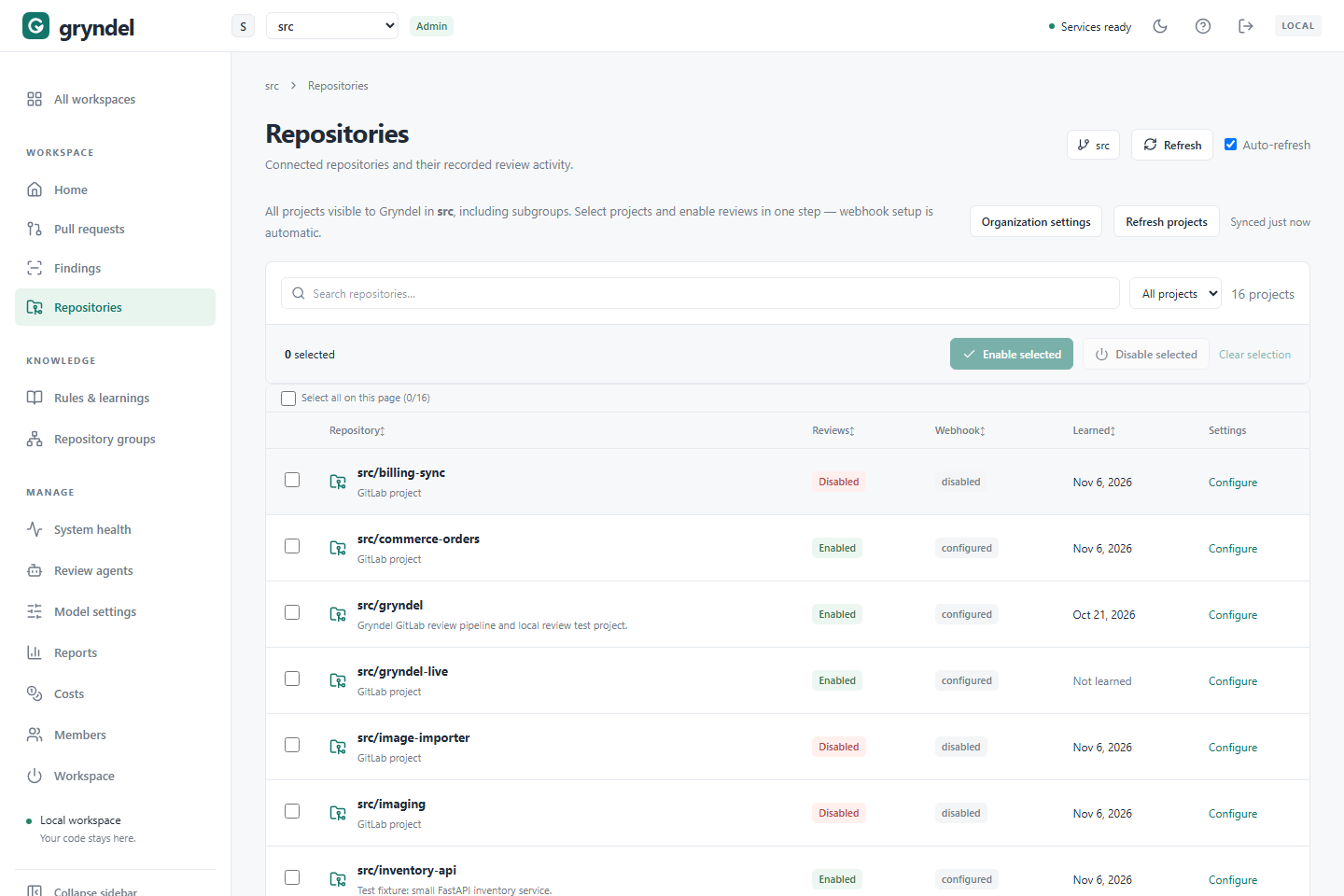
Open the page
In the sidebar, click Repositories. What the list shows depends on where the workspace lives:
| Workspace on | The list shows |
|---|---|
| GitLab | Every project the workspace's reviewer account can see in its root group, including subgroups. |
| GitHub | Every repository that Gryndel's GitHub App can see on the workspace's account (an organisation or a personal account). Which ones the App can see is chosen when the App is installed on GitHub. |
Everyone in the workspace can see the page and open a repository's settings. Only workspace admins can change anything; viewers see the controls greyed out.
| Column | What it shows |
|---|---|
| Repository | The repository's path and its description, or Archived project (Archived repository on GitHub). |
| Reviews | Enabled when Gryndel reviews new merge or pull requests here. Disabled when reviews are off or paused. |
| Webhook | Whether the code host tells Gryndel about this repository's merge or pull requests (see below). |
| Learned | When Gryndel last learned the repository, or Not learned. |
| Settings | Configure opens the repository's settings. |
A webhook is how the code host sends Gryndel a message whenever a merge request (GitLab) or pull request (GitHub) is opened or updated, or someone comments on it.
- On GitLab each project has its own webhook. Gryndel adds it for you when you turn reviews on, and switches it off when you turn them off.
- On GitHub Gryndel's App has a single webhook that covers every repository it's installed on. Turning reviews on or off changes nothing on GitHub; it only tells Gryndel whether to act on that repository's events.
| Webhook | Meaning |
|---|---|
configured | Reviews are on and the webhook is in place. On GitHub, every repository with reviews on shows this. |
disabled | Reviews are off for this repository. |
existing | GitLab only. Reviews are on, but Gryndel has no record of adding the webhook itself, for example because it was set up during installation. |
needs attention | GitLab only. The last change to the webhook failed. The reason is shown under the badge. See If turning reviews on or off fails. |
Use Search repositories to find a repository by path, description or webhook state, and the All projects menu to show only Enabled or Disabled repositories.
Refresh the project list
Gryndel keeps a copy of the repository list so the page loads quickly, and reads the code host again by itself when the copy is more than 15 minutes old. When a repository you expect isn't listed yet, a workspace admin can refresh it (for viewers the button is greyed out):
- GitLab
- GitHub
- Create the project in the workspace's group (or a subgroup) in GitLab, if you haven't.
- Click Refresh projects. The button says Syncing… while it works.
- The label next to it changes to Synced just now, and the new project appears.
- Make sure the App can see the repository. If the App is installed on Only select repositories, add it on GitHub: open the account's Settings, then Applications (GitHub Apps for an organisation), click Configure next to Gryndel's App, and add the repository under Repository access. You need to be an owner of the account.
- Click Refresh repositories. The button says Syncing… while it works.
- The label next to it changes to Synced just now, and the repository appears.
Removing a repository from the App's installation works the same way: it disappears from the list after a refresh, or within 15 minutes.
If the code host can't be reached, Gryndel keeps showing the last list it had and says so. Click Retry when it's back. On GitHub the message GitHub discovery is unavailable. Check that Gryndel's GitHub App is installed on this account. usually means the App was uninstalled from the account.
Turn reviews on or off
Turn on reviews for a repository
When: you want Gryndel to start reviewing a repository's merge or pull requests. If you're rolling Gryndel out to a team, start with one or two active repositories and the default settings, then widen it. See Roll out Gryndel.
- GitLab
- GitHub
Before you start:
- You need to be a workspace admin in Gryndel.
- You need the Maintainer role (or higher) on each project in GitLab. Gryndel checks this first, then changes the webhook using your own GitLab access, not its own account.
- The project must not be archived.
How:
- Tick the checkbox next to each repository you want. Select all on this page ticks every row on the current page. You can change up to 100 repositories at a time.
- Click Enable selected.
- The first time you do this after signing in, Gryndel sends you to GitLab, which asks you to allow Gryndel to make changes as you. Allow it.
- GitLab sends you back. A message asks Enable reviews for the N selected repositories now? Click Enable now (or Not now to leave it).
- A result box lists each repository: Reviews enabled and webhook configured. for the ones that worked, and the reason for any that didn't. Failed ones stay ticked so you can try again.
The extra GitLab access lasts until you sign out. Signing in to Gryndel on its own only reads from GitLab.
Before you start:
- You need to be a workspace admin in Gryndel. No role on the repository itself is needed, because nothing changes on GitHub.
- The repository must be one the App can see (see Refresh the project list), and must not be archived.
How:
- Tick the checkbox next to each repository you want. Select all on this page ticks every row on the current page. You can change up to 100 repositories at a time.
- Click Enable selected.
- A result box lists each repository: Reviews enabled. for the ones that worked, and the reason for any that didn't. Failed ones stay ticked so you can try again.
What happens next:
- On GitLab, Gryndel adds its webhook to the project (or turns an existing one back on). Other webhooks and integrations on the project are left alone. On GitHub nothing changes on the repository.
- Shortly afterwards, Gryndel also looks for merge or pull requests that are already open and queues a review of each one's latest commit. You don't need to push anything.
- From then on, every new commit pushed to an open merge or pull request is reviewed.
Check it worked: the row shows Enabled and webhook configured. Open
Pull requests: reviews of the open merge or pull requests appear within a
minute or so. On the code host, the merge or pull request gets a "Gryndel is reviewing this
merge request" (or "pull request") comment.
Turn off reviews for a repository
When: you don't want Gryndel on a repository any more, or for a while (see Pause, or turn off? for the alternatives).
- Tick the repositories.
- Click Disable selected. On GitLab, Gryndel may send you to GitLab first, as above.
Gryndel stops reviewing. On GitLab it also switches off the events its webhook sends; other GitLab integrations on the project are left alone. On GitHub the App's webhook keeps sending events, and Gryndel ignores the ones for this repository.
Either way, @gryndel commands on that repository's merge or pull requests also stop
being answered. Findings already posted stay on the code host. Clear selection unticks
everything.
When you turn the repository on again, Gryndel reviews the latest commit of each open merge or pull request, as when you first turned it on.
If turning reviews on or off fails
The result box (and, on GitLab, the Webhook column) shows the reason. The repository stays ticked so you can retry it once you've fixed the cause.
| Message | Cause | Fix |
|---|---|---|
| You need Maintainer or Owner access to project in GitLab to turn its reviews on or off. (GitHub: the Maintain or Admin role) | Gryndel checked your own role on that repository first and it is lower. Being a Gryndel admin is not enough. | Ask someone with that role who is also a workspace admin, or ask for the role on the code host, then try again. |
| You need Maintainer access to project in GitLab to change its webhook. | GitLab only. Your own GitLab role on that project is below Maintainer. | Ask a project or group owner to make you a Maintainer (or ask a Maintainer who is also a workspace admin to do it), then click Enable selected again. |
| You did not allow Gryndel to change GitLab as you, so nothing was changed. | GitLab only. You clicked deny on GitLab's permission page. | Repeat the steps and allow it. |
| Allow Gryndel to change GitLab as you, then try again. | GitLab only. Your GitLab permission expired or was revoked during your session. | Repeat the action. Gryndel sends you to GitLab to allow it again. |
| Unarchive this project in GitLab before enabling reviews. | The repository is archived. GitHub repositories get the same message. | Unarchive it (GitLab: Settings > General > Advanced; GitHub: the repository's Settings, at the bottom of the General page), refresh the list, and try again. |
| GitLab webhook setup failed. Retry this repository. | GitLab only. GitLab returned an unexpected error, or couldn't be reached. | Retry. If it keeps failing, check that GitLab is up and look at the project's Settings > Webhooks page in GitLab. |
| Reviews disabled; webhook cleanup needs retry. | GitLab only. Reviews are off in Gryndel, but GitLab refused to switch off the webhook. | Gryndel ignores the events anyway. Click Disable selected again once the cause shown is fixed, so the webhook stops sending them. |
| Settings changed elsewhere. Refresh and retry. | Someone else changed this repository's settings since you loaded the page. | Reload the page and try again. |
| Project is not accessible in this workspace's GitLab group. | The project was moved, deleted, or belongs to another workspace's subgroup. | Click Refresh projects. |
| Repository is not accessible in this workspace's GitHub account. | The repository was removed from the App's installation, renamed, transferred or deleted. | Click Refresh repositories. If it should be reviewed, add it to the App's installation on GitHub. |
| Select up to 100 projects per operation. | More than 100 rows are ticked. | Do them in batches. |
If every repository fails, your organisation's Gryndel may not be able to reach the code host. See Troubleshooting.
Change a repository's settings
- Click the repository name, or Configure in its row. A panel titled REPOSITORY SETTINGS opens.
- Pick a tab and change what you need. A dot on a tab means it has unsaved changes.
- Click Save settings. You see Saved revision N. New review runs use these settings. Discard changes undoes everything you haven't saved.
Each save creates a new revision (a numbered version of the settings).
When changes take effect: only reviews that start after you save. A review that is
already queued or running keeps the settings it started with. To apply new settings to an
open merge or pull request straight away, comment @gryndel review on it.
Under each field you see where its current value comes from:
- Inherited from …: this repository doesn't set it, so the value comes from a higher level, such as organization settings or the built-in default.
- Use inherited (…): the repository sets its own value. Click it to drop that value and inherit again.
- 🔒 Locked by organization settings (or by your Gryndel administrator): the value is fixed for every repository, and you can't change it here.
Review history → at the top of the panel opens Pull requests filtered to this repository.
The rest of this page goes through the tabs in order. If you only change a few things, these are the ones that matter most:
| You want… | Change |
|---|---|
| Fewer false alarms | Review mode → Verified (the default) |
| Fewer comments overall | Min. severity to publish → P1, and in Agents mode Comment level → Whisper |
| Merges blocked by serious problems only | Fail commit status on → P0 findings (the default) |
| Large merge or pull requests reviewed completely | Review mode → Agents, and check Max context chars |
| No source code kept in Gryndel | Code storage → Don't keep code (the default) |
Reviews tab
| Field | Choices |
|---|---|
| Review processing | Enabled, Paused |
| Review mode | Verified · draft and verify, Single pass, Agents · specialist reviewers |
| Review agents | A checkbox per agent, used only in Agents mode |
Choose a review mode
The review mode decides how many model calls a review makes, and whether findings are checked before they are posted.
| Single pass | Verified · draft and verify | Agents · specialist reviewers | |
|---|---|---|---|
| How it works | One model call reads the change and writes the findings. | Three draft calls each look for problems, then a separate verification step checks every candidate finding against the code. Only confirmed findings are posted. | Specialist agents each review the files they're suited for, at the same time. Their findings are combined, and every blocking issue is verified. See Review agents. |
| Model calls | 1 | 3 drafts plus verification, each sending the whole change | 1 per chosen agent (more for large changes), plus a few small coordinating calls and verification |
| Cost | Lowest | At least four times Single pass | Depends on how many agents match the change. Often the highest. |
| Speed | Fastest | Slower: the drafts run one after another | Agents run in parallel, up to the provider's concurrency limit |
| False alarms | Most: nothing is double-checked | Fewest | Few for blocking issues. Suggestions and nitpicks aren't verified, but never block. |
| Large changes | Fails if the change doesn't fit the model | Fails if the change doesn't fit the model | Splits each agent's files into parts that fit |
| Comments | Issues only | Issues only | Issues, plus suggestions, nitpicks and questions, set by Comment level |
Our recommendation:
- Start with Verified. It's the default because it posts the fewest wrong findings, which is what decides whether developers trust Gryndel.
- Switch to Single pass for repositories where cost or speed matters more than precision, for example a busy repository of small low-risk changes, or while you try out a new model. Expect to see more findings that turn out to be wrong.
- Switch to Agents when merge or pull requests are large or mix kinds of code (for example backend, migrations and frontend in one change), when you want suggestions as well as bugs, or when you want different models for different specialties. See When agents mode is worth it.
The built-in default for every repository is the Default review mode in Model settings (Verified unless someone changed it). To see what a mode costs on your own changes, compare reviews on the Costs page, and see Control costs.
Limit the agents a repository uses
Review agents only matters in Agents mode.
- None ticked (the default): every agent that is enabled on the Review agents page can be chosen. New agents are picked up automatically.
- Some ticked: only these agents can review this repository. You see N selected. Only these agents can review this repository.
An agent whose File types match nothing in a change isn't run, so it costs nothing. Ticking matters most for agents that see many files. For example, to cut cost on a busy repository, tick only Bugs & regressions and Security; or, to keep maintainability suggestions out of a repository, tick every agent except Code structure. Agents disabled on the Review agents page show disabled globally and aren't used, even if ticked here.
If every agent you tick is later disabled, reviews of that repository fail with "No review agents are enabled for this repository". Tick another agent, or untick all of them.
Related repositories
Related repositories decides whether reviews check a change against the other
repositories of this repository's groups. It is on by
default and only matters for a repository in a group. Turn it off for a repository whose
changes never affect the others, to save the extra model call. It can also be set in
.gryndel.yaml as cross_repo: false.
Review processing
Setting Review processing to Paused in a repository's own settings, and saving, works exactly like Disable selected. On GitLab, Gryndel switches off the project's webhook, so it needs your GitLab Maintainer access and may send you to GitLab first. On GitHub it just saves. See the next section for other ways to pause.
Pause, or turn off?
There are several ways to stop reviews. Choose by how wide and how long.
| You want to… | Do this | What it does |
|---|---|---|
| Stop one merge or pull request being reviewed automatically, for example a long-running draft | Comment @gryndel pause on it. @gryndel resume turns it back on. | Only that merge or pull request. @gryndel review still reviews it on request. See Commands. |
| Stop one repository | Disable selected, or Review processing → Paused in its settings | Gryndel stops acting on the repository (on GitLab, its webhook is switched off); commands there stop too. |
| Stop every repository in the workspace for a while, for example during a model outage or an incident | Organization settings → Review processing → Paused, tick 🔒 Lock, then Save settings | Repositories stay enabled (and GitLab webhooks stay on). Nothing is reviewed until you set it back. |
| Stop everything, including commands | Turn off the workspace. See Workspace. | Gryndel doesn't review or answer anything in the workspace. |
Repositories turned on with Enable selected carry their own Enabled value, and a repository's value overrides the organization's. So a pause in Organization settings only reaches every repository if you lock it.
What happens to merge and pull requests during an organization-wide pause:
- A review that is waiting to start is skipped. A review that is already running stops at its next step and posts nothing more.
- Commits pushed while paused aren't reviewed. Gryndel records them as skipped.
@gryndel reviewdoesn't override a paused repository either; the request is skipped.- When you set Review processing back to Enabled, nothing is reviewed straight away.
Each merge or pull request is reviewed when its next commit arrives. To review one sooner,
comment
@gryndel review.
After turning a single repository back on with Enable selected (or Enabled in its own settings), by contrast, Gryndel reviews the latest commit of every open merge or pull request within a few seconds. See Pause reviews for a step-by-step guide.
Findings tab
This tab decides what gets posted and what fails the commit status.
| Field | Choices | Default |
|---|---|---|
| Comment level | 🤫 Whisper · verified issues only, 💬 Chat · issues and a few suggestions, 📣 Chatterbox · suggestions, nitpicks and questions | Chat |
| Min. severity to publish | P2 · all findings, P1 · high and critical, P0 · critical only | P2 |
| Suggested fixes | Suggest fixes, Suggest and apply fixes, Don't suggest fixes | Suggest fixes |
| Fail commit status on | P0 findings, P0 or P1 findings, Any published finding, Never fail | P0 findings |
Severities, from most to least serious:
| Severity | Means | Example |
|---|---|---|
| P0 | Critical: a security hole or data loss | A missing permission check lets any user delete another team's projects. |
| P1 | Realistic incorrect behaviour | A discount is applied twice when the basket has more than one item. |
| P2 | A minor real issue | An error message names the wrong field. Convention findings from rules and the repository profile are usually P2. |
Comment level
Comment level only changes Agents mode. In Single pass and Verified modes, Gryndel only ever posts issues, so this setting has no effect there.
In Agents mode, each agent labels its findings as an issue (a real defect), suggestion, nitpick (a minor preference) or question (something the author should confirm). Issues are always verified before they're posted, at every level. The level caps the rest, most severe first:
| Level | Suggestions | Nitpicks | Questions | Choose it when |
|---|---|---|---|---|
| 🤫 Whisper | 0 | 0 | 0 | Developers only want to hear about real defects. |
| 💬 Chat (default) | up to 3 | 0 | 0 | You want the occasional useful improvement without noise. |
| 📣 Chatterbox | up to 8 | up to 8 | up to 5 | A team wants a thorough second reviewer, for example on a new codebase or for mentoring. |
At Chatterbox, an issue the verifier can't confirm either way is posted as a question instead of being dropped. An Agents review posts at most 25 findings in all. Anything over a cap is listed under Withheld in the review details, not lost. Suggestions, nitpicks and questions never fail the commit status.
Minimum severity and fail commit status
These two work together:
- Min. severity to publish decides which findings are posted. Findings below it are kept in Gryndel under Withheld in the review details, not posted to the code host.
- Fail commit status on decides which posted issues mark the commit as failed on the code host. A withheld finding can never fail the status.
Each posted comment says blocking or non-blocking, so the author can see which findings caused the failure.
Worked example. A review finds one P1 issue and two P2 issues.
| Min. severity | Fail on | Posted | Commit status |
|---|---|---|---|
| P2 (default) | P0 findings (default) | All three | Success: no P0 |
| P2 | P0 or P1 findings | All three | Failed: the P1 blocks |
| P2 | Any published finding | All three | Failed |
| P1 | P0 or P1 findings | Only the P1. The two P2s are withheld. | Failed |
| P1 | Any published finding | Only the P1 | Failed |
| P0 | Any published finding | Nothing | Success: nothing was posted |
| any | Never fail | Depends on min. severity | Always success |
A review that couldn't finish part of its work, for example an agent that failed every attempt, always fails the status, so an incomplete review never looks clean.
Our recommendation:
- Start with the defaults (post everything, fail on P0). Developers see every finding, but only critical ones block.
- Fail on P0 or P1 once the team trusts the findings and wants Gryndel to gate merges. Pair it with Verified or Agents mode, so blocking findings are verified.
- Raise the minimum to P1 if P2 findings feel like noise. Note that convention findings from rules and the repository profile are often P2, so this also hides most of them. See Quieten noisy reviews.
- Never fail suits a trial period, or repositories where Gryndel should advise only.
A failed status only blocks merging if the repository requires it. On GitLab, that's a
merge request setting such as Pipelines must succeed. On GitHub, it's a branch
protection rule or ruleset that requires the gryndel/review status check to pass. See
Make reviews stricter.
Suggested fixes
When a fix for a finding is clear and small (up to 30 lines), Gryndel can attach it as a suggestion: a proposed change that anyone can apply to the branch with one click on the code host (on GitHub, Commit suggestion).
| Choice | What happens | Choose it when |
|---|---|---|
| Suggest fixes (default) | Findings carry a suggestion when the fix is clear. People decide whether to apply it. | Almost always. |
| Suggest and apply fixes | GitLab only. As above, and after posting the review Gryndel also commits all its suggestions to the merge request's source branch, as one commit called "Apply Gryndel's suggested fixes". | Teams that accept Gryndel's fixes nearly every time and want to save the clicks. |
| Don't suggest fixes | No suggestions are attached. | Teams that prefer to write every fix themselves. |
GitHub has no way for Gryndel to apply suggestions for you, so Suggest and apply fixes works like Suggest fixes there, and each review that has suggestions also posts Gryndel could not apply its suggested fixes. on the pull request. Leave GitHub repositories on Suggest fixes. A GitHub suggestion can only replace lines the pull request's diff shows; when a fix reaches further, Gryndel shows it as plain code for the author to copy.
Before you choose "Suggest and apply fixes" (GitLab):
- Gryndel's GitLab account needs permission to push to the source branch. Protected branches and forks often refuse it. If GitLab refuses, Gryndel posts Gryndel could not apply its suggested fixes. on the merge request; the suggestions stay on the findings for people to apply.
- The new commit is reviewed like any other. Gryndel never applies fixes to its own commit, so it can't loop.
- Commits appear on the author's branch without them doing anything, which can surprise people and conflict with local work. Tell the team before turning it on.
This setting can only be set in Gryndel, never in a .gryndel.yaml file, so nobody can
make Gryndel commit by pushing a file.
Scope tab
This tab decides how much of a change a review looks at.
| Field | What it does | Default |
|---|---|---|
| Excluded paths | Files Gryndel never reviews, one pattern per line. | None |
| Max files | The most changed files one review covers, from 1 to 80. | 80 |
| Max context chars | The most characters of code sent to the model, from 1,000 to 1,000,000. | 400,000 |
Excluded paths
Exclude generated or third-party code nobody reviews by hand: vendored libraries, lock files, build output, generated clients, snapshots. It saves tokens and avoids findings in code nobody will change.
vendor/**
**/*.lock
**/generated/**
web/src/api/client.ts
- Patterns are matched against the file's whole path from the top of the repository.
Start with
**/to match at any depth. - A renamed file is excluded if either its old or its new path matches.
- Patterns can't start with
/or!, or contain..or\. - Exclusions add up across levels: a repository's exclusions are added to the organization's and the config repositories', never replacing them.
Don't exclude code just because Gryndel finds problems in it. Use a rule or a lower severity setting instead, so real bugs there are still caught.
Large merge requests
This applies to large pull requests in the same way. Gryndel reads at most 80 changed files of a merge or pull request, and skips any file larger than 100,000 characters. Then it applies your settings:
- Excluded paths are removed.
- If more files remain than Max files, or their size is over Max context chars, Gryndel keeps the most useful ones first: source and configuration, then tests, then documentation, then lock files and generated output. A file that doesn't fit is skipped whole, never cut in half.
Size counts each file's whole content before and after the change, plus its diff, not just the changed lines. A model reads roughly 3 to 4 characters per token, so the default 400,000 characters is about 100,000 to 130,000 tokens.
In Agents mode, Max context chars applies to each agent's own files, so a security agent never loses its files to a large unrelated change elsewhere. Each agent's files are also split into parts that fit the model.
What you see when files are left out:
- A grey
+Nin the Files column of Pull requests. - A Coverage limits line in Gryndel's summary comment on the merge or pull request, naming the files.
- A lower merge confidence and review confidence in the summary.
If the change doesn't fit the model at all. In Single pass and Verified modes, if the files kept are still too big for the model's context window, the review fails with "Review input exceeds the selected model budget". Do one of these:
| Fix | When |
|---|---|
| Lower Max context chars to fit the model's window, leaving room for the instructions and answer | You accept that some files go unreviewed. |
| Switch the repository to Agents mode | You want the whole change reviewed; agents split it into parts. |
| Choose a model with a larger context window in Model settings | You want Single pass or Verified to see everything. |
Then replay the review. See Replay a failed review.
Data tab
| Field | Choices | Default |
|---|---|---|
| Code storage | Don't keep code, Standard | Don't keep code |
Code storage decides what Gryndel keeps of your source code.
| Don't keep code | Standard | |
|---|---|---|
| While a review waits | Only paths and changed line numbers. Gryndel fetches the code from the code host when the review starts. | The code is stored with the review. |
| After the review is posted | Each finding's location and title. The full comments stay on the code host. | The code, findings, explanations and evidence. |
| In the review details | Lists, counts and locations; no explanations or evidence | Everything, including the evidence for each verdict |
| Choose it when | Your organisation's policy doesn't allow copies of source code outside GitLab or GitHub | You want to investigate reviews in Gryndel, or tune prompts and agents from the evidence |
Code storage can only be set in Gryndel, never in a repository file. Your Gryndel administrator can set and lock it for every workspace; you then see 🔒 Locked by your Gryndel administrator.
Prompts tab
A prompt is the instruction text Gryndel sends to the model. This tab shows the base prompt of each review step, and Used by under each one says which modes use it:
| Prompt | Used by |
|---|---|
| Review prompt | Single: the review. Verified: each of the three drafts. |
| Verification prompt | Verified: checks each draft finding. Agents: checks each issue. |
| Agent selection prompt | Agents: the orchestrator chooses agents and rates risk. |
| Specialist agents prompt | Agents: shared by every agent, before its own prompt. |
| Merging findings prompt | Agents: the orchestrator groups duplicate findings. |
How:
- Edit the text in a prompt box. Each can be up to 8,000 characters. The text you write replaces Gryndel's guidance for that step; it isn't added to it.
- Under the box, Custom guidance or Built-in guidance says which one is in use. Use built-in guidance goes back to Gryndel's text.
- Click Save settings.
Open Always added by Gryndel to see the fixed rules added after your text. You can't edit them. They stop text in the repository from steering the model, and keep findings in a format Gryndel can read and anchor to changed lines.
Should you edit a base prompt?
Usually not. Try a rule first. Rules are added to the instructions only when they apply, show up as a Rule: line on the findings they cause, and have usage counts, so you can see whether they work. A base prompt changes every review of the repository, silently.
Edit a base prompt when you want to change how Gryndel judges everything, not add one more thing to check. For example:
- Your domain changes what counts as serious, such as "In this codebase, any change that could double-charge a customer is P0."
- The verifier is rejecting real findings, or confirming wrong ones, in a consistent way you can describe.
- Your model follows instructions in another language or style better.
The risks:
- The built-in text defines the severities (P0, P1, P2) and tells the model to report only real bugs, not style. If you remove that, expect inconsistent severities and more noise.
- A wording change can quietly change findings on every merge or pull request. Change one prompt at a time and read a few reviews afterwards.
- Changes made in Organization settings reach every repository that doesn't set its own.
To change what one review agent looks for, edit that agent instead, on the Review agents page.
Prompts can only be set in Gryndel, never in repository files.
Profile tab
See Learn a repository, and Learn again after every merge for When to learn.
Groups tab
Lists the repository groups this repository is in, and whether it is active or disabled in each. It is read-only; create and change groups on the Repository groups page. Reviews check changes against the other active repositories of these groups; see What reviews check.
Effective configuration tab
When: before you save a change, to check it does what you expect; or when a review didn't behave as you expected and you want to know which level set what.
- Open the Effective configuration tab.
- Click Preview. It says Building preview… while Gryndel reads the code host.
- A table lists each Setting, its Value and what Set by it. 🔒 marks a locked value. Prompts show as built-in or custom (N characters).
The preview includes your unsaved changes, so you can try a value and check it before
you save. It reads the repository's .gryndel.yaml and any config repositories (see
How settings combine) from their default branch. A real review
reads the repository's file from the merge or pull request's target branch, which is
usually the same.
When no config repository applies, the preview says so and explains how to add one: No group settings apply. on GitLab, No account settings apply. on GitHub.
The table uses the setting names from .gryndel.yaml:
| Name in the preview | Field |
|---|---|
enabled | Review processing |
review_mode | Review mode |
agents | Review agents |
comment_level | Comment level |
minimum_severity | Min. severity to publish |
fixes | Suggested fixes |
fail_on | Fail commit status on |
exclusions | Excluded paths |
max_files | Max files |
max_context_chars | Max context chars |
data_storage | Code storage |
cross_repo | Related repositories |
learn_on_merge | When to learn |
prompt_review, prompt_verification, … | The prompts |
Below the table:
- Levels, lowest first: every level that was combined, and the commit read.
- Not applied: values a level tried to set but couldn't, with the reason. For example
fail_on from group src (src/gryndel-config): locked by the organization(on GitHub the level reads likeorganization acme (acme/gryndel-config)), orfixes from repo file .gryndel.yaml: set in Gryndel, not in files. - Problems in config files (skipped): mistakes in a
.gryndel.yaml, such asmax_file: unknown setting. Only the bad setting is skipped; the rest still apply. - The number of rules and the guideline files that apply.
You can get the same view on a merge or pull request by commenting
@gryndel configuration. See Commands.
Organization settings
Organization settings sets values for every repository in the workspace at once. Click Organization settings at the top of the Repositories page. It has the same tabs as a repository, except Groups; its Profile tab has only When to learn. You need to be a workspace admin to change it.
Set a value here when it should be the starting point for every repository, but teams may change it. Lock it when it must hold everywhere, whatever a repository or file says.
To lock a setting:
- Set the value you want.
- Tick 🔒 Lock next to the field.
- Click Save settings.
A locked setting can't be changed by repository settings, a config repository, or a
.gryndel.yaml file. Repositories show it as 🔒 Locked by organization settings, and
any attempt to change it is listed under Not applied in the preview.
When to lock:
| Lock it | Why |
|---|---|
| Code storage | Data policy shouldn't depend on each repository's settings. |
| Fail commit status on | If merges are gated on Gryndel, a team shouldn't be able to switch the gate off with a file. |
| Review processing while pausing everything | Otherwise repositories with their own Enabled value carry on. See Pause, or turn off? |
| The prompts | If you've tuned them centrally and want every review judged the same way. |
Leave unlocked settings that reasonably differ per repository: Review mode, Comment level, Min. severity to publish, and the scope limits.
In the Effective configuration tab of Organization settings you can pick any enabled repository and preview how the organization settings, including unsaved changes, combine with its own.
How settings combine
Each review works out its settings from up to six levels. Each level only changes the settings it sets, and each level overrides the ones above it:
- Built-in defaults.
- Your Gryndel administrator (today only Code storage).
- Organization settings.
- Config repositories: a repository named
gryndel-configwhose.gryndel.yaml(on its default branch) applies to many repositories at once. Where it lives depends on the code host:- GitLab: a project named
gryndel-configinside a group applies to every project in that group and its subgroups. Several groups up the tree can each have one; they apply top group first. - GitHub: one repository,
<account>/gryndel-config, applies to every repository of that account. Accounts don't nest, so there's only one. The App must be installed on it, or Gryndel can't read it.
- GitLab: a project named
- Repository settings (the Configure panel).
- The repository's own
.gryndel.yaml, read from the merge or pull request's target branch.
Three exceptions:
- A setting locked by the organization or the administrator can't be changed by any level below it.
- Excluded paths add up across levels instead of replacing each other.
- Code storage, Suggested fixes, When to learn and the prompts are never read from files. Anyone who can push could otherwise change what Gryndel keeps, make it commit, rewrite what it looks for, or have it learn on every merge. Set them in Gryndel.
Note that the repository's file comes after its settings in Gryndel: a value in
.gryndel.yaml wins over the Configure panel, unless the organization locked it.
Worked example
This example uses a GitLab group; on GitHub, read "the account's gryndel-config
repository" for the group's config project.
| Level | What it sets |
|---|---|
| Built-in defaults | Verified, Chat, P2 minimum, fail on P0, nothing excluded, Don't keep code |
| Organization settings | Fail on P0 or P1 (🔒 locked); excluded **/*.lock |
Group gryndel-config | review_mode: agents; fail_on: P2; exclusions: ["vendor/**"] |
| Repository settings | Min. severity to publish: P1 |
Repository .gryndel.yaml | comment_level: whisper; exclusions: ["docs/**"]; fixes: apply |
The review uses:
| Setting | Result | Why |
|---|---|---|
| Review mode | Agents | From the group; nothing lower changes it. |
| Comment level | Whisper | From the repository file. |
| Min. severity to publish | P1 | From the repository settings. |
| Fail commit status on | P0 or P1 | The organization locked it, so the group's P2 is listed under Not applied. |
| Excluded paths | **/*.lock, vendor/**, docs/** | Exclusions add up across levels. |
| Suggested fixes | Suggest fixes | The built-in default. fixes: apply in the file is ignored, because fixes are set in Gryndel only. |
| Code storage | Don't keep code | The built-in default. |
.gryndel.yaml reference
Put the file at the top of the repository, or of a gryndel-config repository (a GitLab
group's config project, or a GitHub account's). Settings go under reviews::
reviews:
  enabled: true                # false pauses reviews for changes into this branch
  review_mode: agents          # single | verified | agents
  agents: [bugs, security]     # agent IDs, used in agents mode
  comment_level: chat          # whisper | chat | chatterbox
  minimum_severity: P2         # P0 | P1 | P2
  fail_on: P0                  # P0 | P1 | P2 | none
  exclusions: ["**/*.lock", "vendor/**"]
  max_files: 80
  max_context_chars: 400000
  cross_repo: true             # false: don't check against related repositories
rules:
  - {id: tests-required, rule: New endpoints need an integration test., scope: ["services/**"]}
disabled_rules: [some-inherited-rule]
fail_on: P2 means Any published finding, and none means Never fail. The agent
IDs of the built-in agents are bugs, security, database, contracts, frontend,
styles and structure. For rules: and disabled_rules:, see
Rules & learnings.
If the file has a mistake, Gryndel skips the bad setting, reports it in the preview, and the review still runs. Check the result with Effective configuration before you rely on it.
Learn a repository
Gryndel can read a whole repository and write two short files that describe it, then propose them in a merge or pull request, together with a third file that lists what the repository shares with other systems:
.gryndel/profile.md: the layout of the code, where each kind of new code goes, and the conventions the code follows. Reviews report changes that break them as convention findings, at P2..gryndel/architecture.md: how the application works and why: its parts, key flows, invariants and design decisions, with diagrams. Reviews read it as background, to notice a change that breaks a flow or an invariant..gryndel/contracts.yaml: the HTTP endpoints the repository serves and calls, the packages it publishes and depends on, the database tables it owns and uses, the message topics and queues it publishes to and subscribes to, and the files it writes for, or reads from, other systems, each with the file and line it comes from. It includes other systems the repository talks to, even if they are not in any group. Reviews use it to report changes that break other repositories of the same group.
Correct the contracts
The learned part of contracts.yaml is a reading of the code, so check it in the merge or
pull request like the other files: remove an entry that is wrong or fix its route. Gryndel
writes everything above declared: again every time it learns the repository, so a
correction there is lost. Put what Gryndel cannot learn, or gets wrong, under declared:,
with the same keys. Gryndel keeps that block exactly as you wrote it, comments included, and
an entry there replaces a learned entry for the same route or package. For example, an
endpoint consumed from another service, called through a client the code does not show.
sends lists the body and query fields the call sends, fields the response fields it reads:
declared:
  consumes:
    http:
      - route: POST /items/{id}/adjust
        service: inventory-api
        sends: [change]
        fields: [id, quantity]
Tables, messages and files go under database, messages and files, each with a
name, a where and its fields (columns, procedure parameters, message fields or file
columns). Under provides, list the tables, views, stored procedures and functions the
repository's schema creates, the topics it publishes to and the files it writes or keeps for
others (exports, saved queries); under consumes, the database objects another system owns
that it reads, writes or calls, the topics it subscribes to and the files it reads or runs.
Add database: with the database's name when two databases have tables of the same name;
entries that both name a database only match when the names agree:
declared:
  consumes:
    database:
      - name: billing.invoices
        fields: [id, total_cents]
    messages:
      - name: orders.created
        fields: [order_id, total_cents]
    files:
      - name: exports/items.csv
        fields: [sku, quantity]
Gryndel compares routes without regard to how parameters are written ({id}, :id and
<id> are the same) or to a base URL in front. Table, topic and file names are compared
ignoring case and quotes; a table without its schema matches the same table with one. A mistake in declared: does not lose what Gryndel learned, and an entry that does not fit
is skipped on its own.
Database repositories
A repository that holds database schema (tables, views, procedures, saved queries) can say
which server and database each folder belongs to. Gryndel then records both on every
table, view and procedure it learns there, so two databases with a table of the same name,
such as orders on the live server and orders on the archive server, stay two tables.
Nothing has to move. Use the layout the repository already has:
| Layout | What to add | Example |
|---|---|---|
| A folder per server, a folder per database inside it | A server.yaml in each server folder (it may be empty) | orders-cluster/server.yaml, orders-cluster/orders/tables/orders.sql |
| One server for the whole repository | A server.yaml at the top; each top-level folder is a database | server.yaml, orders/schema.sql, billing/schema.sql |
| One database for the whole repository | Nothing: Learn proposes .gryndel/databases.yaml | schema/001_items.sql, views/low_stock.sql |
| Any other layout | .gryndel/databases.yaml, mapping existing folders | below |
A server is named after its folder, or after the repository when server.yaml is at the
top; name: in server.yaml overrides it. server.yaml can also list the server's other
names, which connections are matched with, and the links it defines:
also_known_as:          # hostnames, replicas and IPs with the same schema
  - orders-db.internal
linked:                 # links this server defines, to the server they point at
  server2: reporting-cluster
.gryndel/databases.yaml maps folders to servers and databases. A file belongs to the
database whose folder is the longest match for its path, and . is the whole repository:
orders-cluster:
  also_known_as: [orders-db.internal]
  databases:
    orders: migrations/orders
    billing: sql/billing
reporting-cluster:
  databases:
    analytics: .
What Learn proposes. When a repository has only SQL and its documents and settings (no
program code), and neither server.yaml nor .gryndel/databases.yaml, Learn proposes
.gryndel/databases.yaml in the same merge or pull request:
- The server is named after the group or organisation the repository is in.
- Top-level folders named after a database the SQL creates or uses (
CREATE DATABASE,USE,\connect) are one database each. SQL files outside them are listed in the description, left out. - Otherwise the whole repository is one database, named after the database every file
USEs, or after the repository.
Correct the names before you merge it; then learn the repository again so its contracts
carry them. In a database repository, an entry under declared: replaces a learned one only
when it gives the same server and database as well as the same name. An application
repository with migrations is not given a map: its tables are placed by its connection
instead (below). A change to server.yaml or .gryndel/databases.yaml applies once the
database repository is learned again.
Linked servers
A query can read another server's tables through a link the server it runs on defines:
LIVE.orders.dbo.orders or OPENQUERY(LIVE, 'SELECT ... FROM orders') on SQL Server,
orders@live on Oracle, a foreign table on PostgreSQL. The link's name means something only
on that server, so Gryndel records the links of each server in a database repository, from
its SQL:
EXEC sp_addlinkedserver @server = N'LIVE', @datasrc = N'orders-db.internal'(with@catalogfor the database),CREATE DATABASE LINK live ... USING '//orders-db.internal:1521/ORDERS',CREATE SERVER live FOREIGN DATA WRAPPER postgres_fdw OPTIONS (host 'orders-db.internal', dbname 'orders'),
and the objects its views, procedures and queries read through them: four-part names,
name@link, the tables inside OPENQUERY(link, '...') and EXEC ('...') AT link, what a
synonym (CREATE SYNONYM orders_live FOR LIVE.orders.dbo.orders) or a foreign table points at.
The link's host is matched with the servers' also_known_as, so in a group with the order
databases, a reporting view reading LIVE.orders.dbo.orders relates to the orders table on
orders-cluster, not to the archive's table of the same name.
When the links are set up outside the repository, name them in server.yaml (or under the
server in .gryndel/databases.yaml); a link written there wins over one found in the SQL:
linked:
  live: orders-cluster            # a server, by its name or another name
  archive: archive-db.internal/orders   # a host and database
A link no server in the group defines leaves the name unplaced, and it is shown as a possible match. Changes apply once the database repository is learned again.
Database connections
Code rarely says which database a query runs against; its connection does. When Gryndel
learns an application, it reads its configuration files (.env files, Compose files,
Kubernetes and Helm manifests, appsettings*.json, application*.yml and .properties,
config/database.yml, settings.py) and records each database connection in
.gryndel/contracts.yaml, by the name the code uses, with the host and database it points
at:
connections:
  DATABASE_URL: orders-db.internal/orders
  spring.datasource.url: reports-db/analytics
Each table the code uses records the connection it goes through (connection: DATABASE_URL) when the code shows it; an application with one connection uses it for all.
When repositories are related, the host is matched with the names of the servers in the
group's database repositories (their name and also_known_as), so
orders-db.internal/orders is the orders database on orders-cluster.
Credentials. Only the host and the database name of a connection string are kept. User names and passwords are removed from every file before the model reads it, and never reach the contracts file, the merge request or Gryndel's database. Gryndel never connects to your databases.
When Gryndel can't tell. A connection whose value is injected at deploy time, built
from several variables (DB_HOST, DB_NAME), or whose host no database repository lists,
leaves its tables unplaced, and their matches are shown as possible. Say where it points
under declared:, by server and database:
declared:
  connections:
    DATABASE_URL: orders-cluster/orders
When to learn a repository
Do it when:
- Gryndel's findings miss things that depend on how this codebase works, or flag code that is fine "because that's how we do it here".
- New code keeps landing in the wrong place, or ignores a pattern the rest of the code follows.
- The repository is large or unfamiliar, and you want reviews to understand its flows.
Skip it when the repository is tiny, short-lived, or has no consistent conventions yet:
the profile would describe accidents rather than rules. If you already keep conventions in
AGENTS.md or similar, reviews read those anyway (see
Guideline files); learning adds the architecture and the
placement rules on top.
Learn it
Before you start: you need to be a workspace admin. Gryndel must be able to push a branch and open a merge or pull request in the repository: on GitLab, its service account needs that permission in the project; on GitHub, the App's permissions already include it. Learning reads the repository with your model provider and makes many model calls, so expect it to take longer, and cost more, than a review.
- Click Configure on the repository, then open the Profile tab.
- Click Learn this repository (or Learn again).
- Wait. The tab shows Waiting for a worker…, then what Gryndel is reading. Learning takes a few minutes, longer for a large application. You can close the panel meanwhile.
- When it's done, the tab links to merge request !N (or pull request #N), which
proposes the files from the branch
gryndel/repository-profile. - Open it on the code host, check it (see below), correct anything that's wrong, and merge it.
What happens next: reviews of changes into that branch follow the profile once it is merged. The tab then says Merged from merge request !N. Reviews follow it. (or pull request #N) and the Learned column shows the date. If it's closed without merging, reviews don't use it; click Learn again to propose it again.
Check it worked: Gryndel's summary comment on each reviewed merge or pull request has a
Repository profile: line saying whether that review followed .gryndel/profile.md.
What to check in the profile merge request
The same checks apply to a profile pull request on GitHub. The profile becomes a set of rules that every review enforces, so read it as you would a new team policy. Edit the files on its branch before merging.
| Check | Why |
|---|---|
| Conventions describe what the team wants, not just what the code happens to do | A convention copied from old code you're moving away from will flag every change that follows the new way. Delete or reword it. |
| Each convention is specific and checkable | "Errors are handled consistently" can't be enforced. "Route handlers return errors through ApiError, never raw exceptions" can. |
| Where new code goes matches your plans | A wrong placement rule produces a finding on every file someone puts in the right place. |
| Layout covers every important part of the code | A missing area means reviews know less about it. The description says if Gryndel couldn't finish reading some parts. |
| Architecture flows and invariants are correct | A wrong invariant leads reviews to report correct code as a problem. |
| Nothing sensitive is written down | The files are committed to the repository. |
You can keep editing both files after merging, like any other file. Reviews follow whatever is merged.
When to learn again
- After a large restructure, a framework change, or a change in conventions.
- When findings start citing conventions that no longer apply.
- After the profile merge or pull request was closed without merging.
To have Gryndel do this for you, see Learn again after every merge.
Learning again starts from the code, not from the current files. If nothing changed, the tab says The merged profile already matches. and nothing new is opened. Otherwise the new merge or pull request shows exactly what would change. If you edited the files by hand, check it doesn't undo your edits, and put them back on its branch before merging.
If learning fails, the tab shows Learning failed: and the reason. Common causes are the model provider being unavailable, or the code host refusing Gryndel's branch or merge or pull request. Fix the cause and click Learn again.
Learn again after every merge
When: the code changes often, and you don't want an admin to remember to click Learn again. Repository groups also mark contracts Possibly out of date after changes; this keeps the proposal current.
- Click Configure on the repository, then open the Profile tab.
- Under When to learn, choose Also after every merge into the default branch.
- Click Save settings.
To do it for every repository, set it in Organization settings instead, and lock it if repositories shouldn't turn it off.
What happens next: each time a merge or pull request is merged into the default branch,
Gryndel learns the repository again and updates its merge or pull request on
gryndel/repository-profile. The Profile tab says After merge request !N was merged
by … (or pull request #N), and so does the proposal's description.
- You still review and merge the proposal. Until you do, reviews and repository groups use the files already on the default branch.
- Merging Gryndel's own proposal doesn't start another learn.
- Several merges close together share one learn: a learn that hasn't started yet reads the branch when it starts.
- Only merges count. A commit pushed straight to the default branch doesn't start a learn.
- Each learn costs the same model time as clicking Learn again, however small the merge. On a busy repository, that adds up.