Pull requests
The Pull requests page is the history of every review Gryndel has run in your workspace. Come here to find the review of your merge request (GitLab) or pull request (GitHub), follow it while it runs, understand why it failed or took a long time, and read the evidence behind each finding. Everyone in the workspace can use it; only workspace admins can replay a failed review.
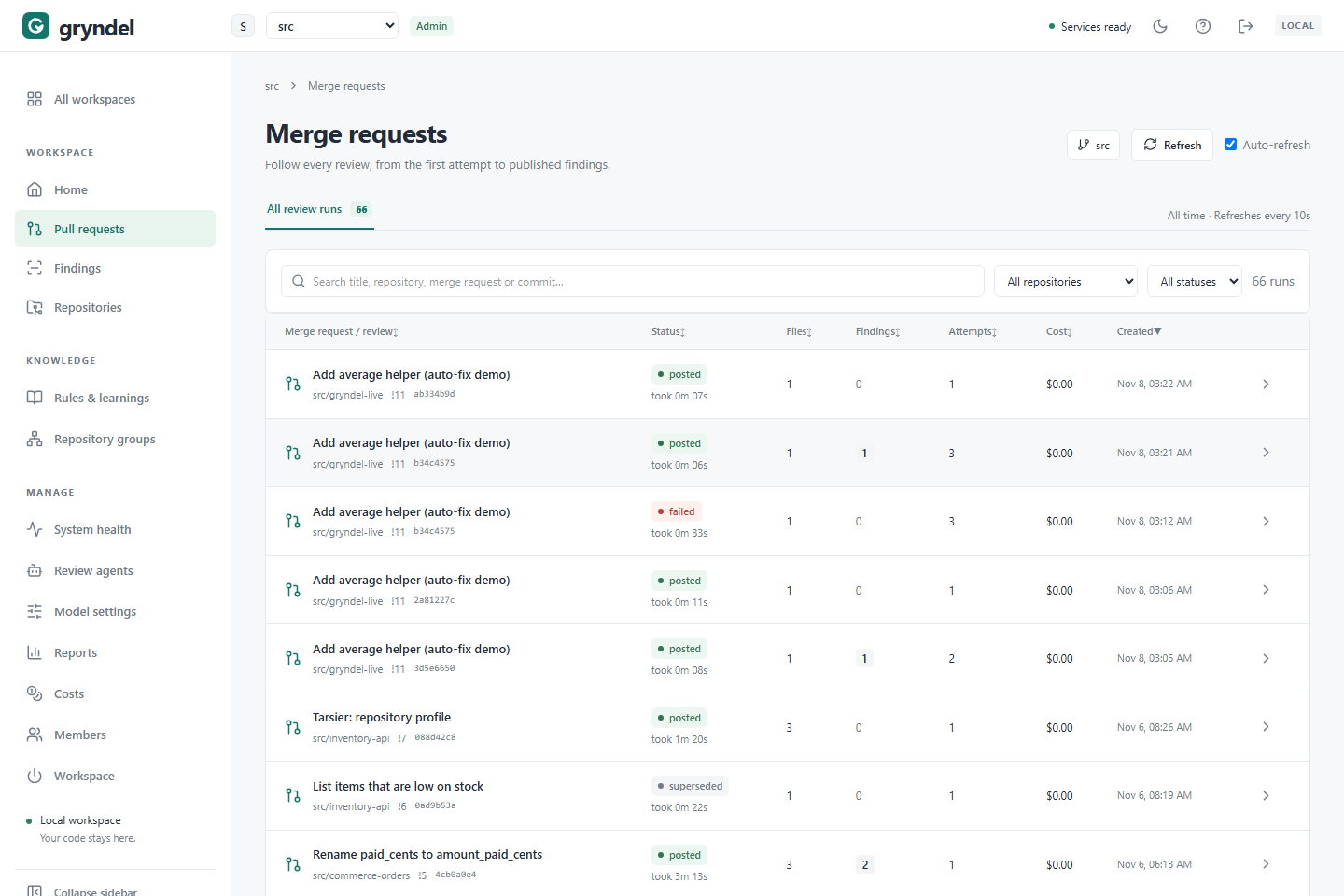
The sidebar link is always called Pull requests. In a GitLab workspace the page itself is
titled Merge requests and speaks GitLab's language (!12, View in GitLab); in a
GitHub workspace it says Pull requests, #12 and View in GitHub. The page works the
same way on both.
How reviews are created
Each row on this page is a review run: one review of one commit of a merge or pull request.
- When a merge or pull request is opened in an enrolled repository, or someone pushes a new commit to it, GitLab or GitHub tells Gryndel (through a webhook) and Gryndel creates a run for the newest commit.
- If the same commit is announced twice, Gryndel doesn't review it twice.
- Commenting
@gryndel reviewon the merge or pull request always creates a new run of the latest commit, even if that commit was already reviewed. - When a newer commit arrives while a run is still waiting or running, the older run is superseded: it stops and its results are never posted.
- If a webhook never arrives, Gryndel's background check of open merge and pull requests in enrolled repositories finds the new commit and reviews it anyway.
So one merge or pull request usually has several rows, one per commit. The newest one is the one that matters.
The repository's settings and rules are fixed when the run is created. Changing a setting or a rule afterwards doesn't affect runs that already exist, including when you replay them.
Find the review of your merge request
Where: in the sidebar, under WORKSPACE, click Pull requests. A small number next to it tells you how many reviews are waiting or running right now.
- Type in the search box (Search title, repository, merge request or commit, or
… pull request or commit on GitHub). It matches the title, the repository, the number
(
!12on GitLab,#12on GitHub, or just12) and the commit. Press Ctrl+K (Cmd+K on a Mac) to jump to the search box. - Narrow the list with the menus next to it: All repositories to pick one repository,
and All statuses to pick one status, such as
failed. - Click the title (or the arrow at the end of the row) to open REVIEW DETAILS.
- Clear filters removes the search and both filters.
The list is newest first, so the top row for your merge or pull request is its latest review. Your search and filters are kept in the page address: bookmark a filtered list, or send the link to a colleague. Opening a review adds it to the address too, so you can share a link that opens straight to that review.
Gryndel's summary comment on the merge or pull request ends with the commit it reviewed. Paste the first characters of that commit into the search box to find exactly that run.
Read the list
Click a column heading to sort by it; click again to reverse the order.
| Column | What it shows |
|---|---|
| Merge request / review (GitLab) or Pull request / review (GitHub) | The title, then the repository, the number (!12 or #12) and the first 8 characters of the commit. |
| Status | Where the review is (see What each status means). While it runs you also see how long it has been waiting or running; when it ends, how long it took. |
| Files | How many changed files were reviewed. A grey +N means N more changed files were left out before the review started (hover over it). |
| Findings | How many findings Gryndel posted. |
| Attempts | How many times Gryndel tried this review. It retries some errors on its own. |
| Cost | What the model calls cost, over every attempt (see What a review cost). |
| Created | When the run was created. |
On a narrow screen, Attempts and Cost are hidden. At the bottom you can choose 25 / page, 50 / page or 100 / page (remembered in this browser) and move with Previous and Next.
What each status means
| Status | What it means | What to do |
|---|---|---|
queued | Waiting for a worker to pick it up. A review that hit a temporary error also goes back to queued before its next attempt. | Usually nothing. If it waits for a long time, see Why a review takes long. |
running | Gryndel is reviewing the commit. | Open it to watch the progress. |
posted | Finished. The findings, the summary comment and the commit status are on the merge or pull request. | Read the findings, here or in GitLab or GitHub. |
failed | Gryndel gave up on this commit. The merge or pull request says it could not finish. | Open it, read why, fix the cause, then replay it or comment @gryndel review. |
superseded | A newer commit arrived before this run finished, so it was dropped. | Nothing. Look at the newest run of the merge or pull request. |
skipped | Gryndel deliberately didn't review this commit (see below). | Only act if you expected a review. |
cancelled | Someone commented @gryndel cancel. This status isn't in the status menu. | Comment @gryndel review to review again. |
Why a run is skipped. Gryndel skips a commit when:
- reviews of the repository are Paused on Repositories;
- someone commented
@gryndel pauseon the merge or pull request (a@gryndel reviewstill runs); - the merge or pull request was closed, or the repository's
.gryndel.yamlon the target branch turns reviews off; - reviews are turned off for the whole workspace on the Workspace page. When they are turned back on, Gryndel reviews the open merge and pull requests again.
If you expected a review, check those in order, or see Troubleshooting.
Why a review takes long
The Status column shows waiting … for a queued run and running … for a running one.
Open the run to see which step it's on.
| What you see | Likely cause | What to do |
|---|---|---|
| Waiting for a worker for a long time | Other reviews are ahead of it, or Gryndel's workers aren't running. | Check the number next to Pull requests and System health. |
One step keeps running, with · try 2 or more | The model returned an error or an answer Gryndel couldn't use, so the step is repeated. | Wait. If every review does this, the model may be too small for the job; see Model settings. |
attempt 2 or attempt 3 in the progress box | A whole attempt failed, for example because the provider was rate-limiting, and Gryndel is trying again. It waits longer after each rate limit. | Wait. After three failed attempts the run fails. |
| Preparing the review, or publishing results to GitLab… (or …to GitHub…) | Gryndel is fetching the code or posting comments. | Wait a moment. If it stays for many minutes, check the GitLab or GitHub row on System health. |
| Many files, many steps | A large change, or Agents mode with many agents, needs many model calls. | Compare with Estimate in the change profile. |
A run that makes no progress at all for 15 minutes is sent to a worker again automatically.
To see the progress without leaving GitLab or GitHub, comment @gryndel status on the merge
or pull request.
See also Troubleshooting.
Open a review
Click a title, or the arrow at the end of the row. REVIEW DETAILS slides in from the side; close it with X or the Esc key.
The top shows the repository, the number (!12 or #12), the title and the status.
View in GitLab (or View in GitHub) opens the merge or pull request. Below that:
| Field | Meaning |
|---|---|
| Commit | The commit that was reviewed. |
| Created | When the run was created. |
| Attempts | How many times Gryndel tried it. |
| Runtime | How long the current attempt has run, or how long the last attempt took. |
| Tokens · input / output | How much text went to the model and how much came back, over every attempt. A token is a small piece of a word; providers charge per token. |
| Cost | What the model calls cost. |
| Model | The model that did the review. |
If the panel says A newer commit superseded this run. These findings are historical., you're looking at an older commit. Its findings may already be fixed or out of date; open the newest run of the merge or pull request instead.
Read the change profile
The Change profile box describes the change and how risky it is. It appears as soon as
the run exists, before the review starts. The badges at the top, such as high risk,
Merge 3/5 and Review 4/5, summarise it. Hover over a badge for the reason.
| Row | Meaning |
|---|---|
| Size | Files, lines added and removed, directories, and how many files were left out at intake. |
| Languages | The programming languages in the change. |
| Estimate | The expected cost, time, number of model calls and tokens. It says Not available when the repository keeps no code. |
| So far / Actual | The cost, time and tokens used, while the review runs and after it ends. |
| Risk | Which changed files set the risk level. |
| Merge confidence | A score out of 5, from the findings. |
| Review confidence | A score out of 5 for how thorough the review was. |
Risk
Risk says how much damage a mistake in this change could do, based on which files changed, not on what Gryndel found.
| Level | When |
|---|---|
critical | Changes under auth, security, billing, payments, migrations, infra, terraform, helm or k8s folders, Terraform files, CI pipelines, OpenAPI files, or SQL that creates, alters or drops tables or indexes. |
high | Dependency and build files (such as package.json, pyproject.toml, go.mod, Dockerfile), or code under core, shared or common folders. |
medium | Any other code change. |
low | Only documentation, or only tests. |
In Agents mode the orchestrating model may raise the level (the Risk row then says orchestrator: and why), but never lower it.
Merge confidence
"How safe is this to merge, given what Gryndel found?" It starts at 5 and goes down with each posted finding: any P0 finding sets it to 1, each P1 takes off a point, and P2 findings take off a little. It's capped at 4 when files were left out of the review. The row lists the open findings it's based on.
Review confidence
"How sure is Gryndel about its own review?" It's the verifier's average confidence in its verdicts, then capped: at 2 when a review agent didn't finish, at 3 when files were left out, and at 4 when no finding needed verifying.
When to care
Risk and the two scores are guidance for the people reviewing. They don't change the commit status. Use them like this:
| You see | What it suggests |
|---|---|
critical or high risk | Give the change a careful human review whatever Gryndel found. |
| Low Merge confidence | Read the findings before merging; at 1 there is a critical finding. |
| Low Review confidence | Gryndel didn't see everything, or wasn't sure. Don't read "no findings" as "no problems". Check Size for files left out and Agents for agents that didn't finish. |
High scores and low risk | A good candidate for a lighter human review. |
Files left out happen when a change has more files than the repository's limit, when GitLab or GitHub doesn't return a file's full diff, or when a file is too large. Gryndel reviews source code first and leaves out tests, docs and lock files before it. To review more, change Max files or Excluded paths on Repositories, or split the merge or pull request.
Follow a review in progress
While a run is queued or running, a progress box shows Waiting for a worker or Reviewing, the time so far, the attempt number, the review mode and the model. A bar and a list show each step with its time and tokens:
- Reviewing (Single pass mode) or Draft 1 of N (Verified mode): the model reads the change and proposes findings.
- Choosing agents, Agent · … and Combining findings (Agents mode).
- Verifying findings: a second pass checks each proposed finding against the code.
A step marked reused from an earlier attempt finished in a previous attempt and was kept. The page updates itself every few seconds.
What a review cost
Cost in the list and in the details is what the run's model calls cost, over every attempt, including failed ones. Click the Cost line in the details to see each step with its provider, model, calls and tokens.
- Costs are worked out from the prices set now in Model settings. Changing a price changes the cost shown for past reviews too.
- A model with no price counts as $0, and the line says (some models have no price). Set a price if you want real totals.
- Compare Actual with Estimate in the change profile. A review that cost far more than its estimate usually retried a lot; check the attempts and steps.
For totals across the workspace, see Costs.
Agents, profile and rules
Below the progress and cost you may see:
- Agents (Agents mode only): which review agents ran, how many files and candidate findings each handled, and which were Not used, with the reason (no matching files, provider disabled or not selected). See Review agents.
- Repository profile: whether this review followed the repository's learned profile. See Learn a repository.
- Rules: the rules and guideline files this review used. Each rule says whether it was written, learned or from .gryndel.yaml; guideline files say base branch. Use this to check that a rule applied; see Rules & learnings.
Findings, Withheld and Verification
Three tabs show what the review found and why. The number on each tab is how many items it holds.
Findings
The findings Gryndel posted on the merge or pull request. Each card shows:
- Severity:
P0is critical (a security hole or data loss),P1is realistic incorrect behaviour,P2is a minor but real issue. - In Agents mode, a label:
issue(a verified problem),suggestion,nitpickorquestion. Only issues can fail the commit status. - Category:
logic,security,reliability,convention(breaks one of your rules or guideline files), orcross-repo(breaks another repository of the same group; the comment sayscross-reponext to blocking). - The title, the file and line (on an added or deleted line), and the explanation.
- Suggested fix: replacement code people can apply from the comment, with Apply suggestion in GitLab or Commit suggestion in GitHub. On GitHub, a fix that reaches beyond the lines the diff shows is posted as plain code ("Replacing lines 5-10") instead, because GitHub only accepts suggestions on lines in its diff.
- Rule: the rule the finding is based on. Found by: the agents that found it.
No publishable findings means nothing passed the checks. It doesn't prove the change is free of defects, especially when Review confidence is low.
Withheld
Possible findings (candidates) that Gryndel didn't post. Open one to see it and the reason.
| Reason | What it means | Should you worry? |
|---|---|---|
verification rejected | The verifier checked it against the code and judged it rejected or uncertain. The detail gives its reasoning. | Rarely. Skim them on risky changes; the verifier can be wrong. |
severity policy | Less severe than the repository's Min. severity to publish. | No, that's your setting. Lower it if you want these. |
comment level | Over the limit for the repository's Comment level, or beyond the most findings one review posts. | No. Raise the comment level if you want more. |
dismissed | Someone replied @gryndel ignore this on that finding earlier in the merge or pull request. | No. |
duplicate | Another finding already says the same thing. | No. |
unknown file / invalid anchor | It pointed at a file or line that isn't part of the change, so GitLab or GitHub couldn't show it. | Only if many candidates do this; the model may be struggling. |
A real problem among the withheld candidates is a sign to tune the setup: see Repositories.
Verification
How the verifier judged each candidate: confirmed, rejected or uncertain. Open one to
read the reasoning and the Trigger (what makes the problem happen), Expected and
Actual behaviour. This is the place to check why a finding was posted or held back.
Other notes
- Anchor adjustments: findings that spanned several lines, which Gryndel anchored to their first line.
- A note that Gryndel applied its suggested fixes in a commit (that commit gets its own review), or couldn't apply them. Automatic fixes are GitLab only: on GitHub, Gryndel never commits fixes itself and posts a notice instead; people commit the suggestions they want with Commit suggestion.
- Coverage notes, such as files the model couldn't fit.
- Applied repository policy: the settings this run used, fixed when it was created.
New repositories use Don't keep code by default. For those, Gryndel keeps only each finding's location and title. Explanations, withheld candidates and verification are only in the merge or pull request's comments in GitLab or GitHub, and the panel says This repository keeps no code. To keep them here, change Code storage on the repository's Data tab (see Repositories).
Replay a failed review
When: a review failed because of something you have now fixed, such as the model being unavailable, a rejected API key, or GitLab or GitHub being unreachable. Replaying runs the same run again, with the settings and rules it was created with.
Before you start: you need to be a workspace admin, the run must be the newest one of its merge or pull request, and reviews must be on for the repository.
-
Open the failed review. A red box says Review failed: with a failure code and, where Gryndel knows it, what went wrong.
-
Fix the cause. Common ones:
Failure Typical fix The model or API key is the problem, or a banner says so Fix it in Model settings, then Test connection. ContextBudgetExceededError, or "the code doesn't fit"Split the merge or pull request, add Excluded paths, or use a model with a larger context window. RateLimitedErrorThe provider kept refusing requests. Wait, or raise your limits with the provider. A connection error with no description Check System health. "Gryndel hit an internal error" A bug in Gryndel; replaying may fail the same way. Report it. -
Click Replay failed run.
-
You see Replay queued. Run status updates automatically. The status changes to
queued, thenrunning. Its attempts start again from 1.
What happens next: the review runs as usual and, if it succeeds, posts to the merge or pull request and replaces the "could not finish" comment.
If you can't replay:
| You see | Why | What to do |
|---|---|---|
| Only workspace admins can replay a review. | You're a viewer. | Ask an admin, or comment @gryndel review on the merge or pull request. |
| A newer commit on this merge request has its own review… (or …this pull request…) | Only the newest run can be replayed. | Look at the newest run instead. |
| This run is no longer eligible for replay. | The run changed state while you were looking, or reviews of the repository are paused. | Refresh the page; check the repository on Repositories. |
| The replay fails again the same way | The cause isn't fixed. | Read the new failure detail. See Troubleshooting. |
Replay or comment @gryndel review?
| Replay failed run | @gryndel review | |
|---|---|---|
| Who can do it | Workspace admins, in Gryndel | Anyone with the Developer role or higher (GitLab) or write access to the repository (GitHub), on the merge or pull request |
| Works on | Only a failed run that is the newest of its merge or pull request | Any open merge or pull request, at any time |
| Commit reviewed | The commit the run was created for | The latest commit |
| Settings and rules | The ones in force when the run was created | The ones in force now |
| Paused merge or pull request | n/a | Runs anyway |
Use replay after fixing a temporary problem, to finish exactly the review that failed.
Use @gryndel review after changing settings or rules, to review again after a cancel, or
when you're not a Gryndel admin. Both cost a full review.
Cancel a review
There's no cancel button in Gryndel. To stop a queued or running review, comment on the merge or pull request:
@gryndel cancel
A running review stops within a few seconds, its status becomes cancelled, and the merge or
pull request says Gryndel stopped reviewing. You need the Developer role or higher on the
project in GitLab, or write access to the repository in GitHub. Comment @gryndel review to
start again. To stop automatic reviews of one merge or pull request, comment
@gryndel pause instead. See Commands.
Gryndel is a GitHub App, and an App can't be @-mentioned, so GitHub won't suggest
@gryndel as you type or notify anyone. Type it in full: Gryndel reads every new comment
and acts on those that start with its command word, usually @gryndel.