Rules & learnings
A rule tells Gryndel something your team cares about that it wouldn't check on its own, for example "new API endpoints need an integration test". This page explains why you'd write rules, the four places they can live, how to write one that works, and how to check that Gryndel follows it.
Why write rules?
Out of the box, Gryndel only reports real bugs: code that will behave wrongly, such as a crash, a wrong result, a security hole or lost data. On purpose, it doesn't comment on style, naming, missing tests or your team's own policies, because those differ from team to team and would otherwise be noise.
Rules are how you add those checks. Typical reasons:
| Situation | Example rule |
|---|---|
| A team policy that reviewers keep having to repeat | "Every new API endpoint needs an integration test in tests/integration." |
| A mistake that caused an incident before | "Log messages must never include customer email addresses or tokens." |
| A convention in one part of the code | "Database migrations must be reversible: every upgrade() needs a working downgrade()." |
| A library or pattern you are moving away from | "Use httpx, not requests, in new code." |
Don't write rules for things Gryndel already does ("find bugs", "check for security issues"), or for things too vague to check in a diff ("write clean code"). They add text to every review without changing what it finds.
Where rules live, and which to use
You can give Gryndel rules in four ways. They all end up in the same place during a review, so choose by who should own the rule and how it should be changed.
| Where | Best for | Who can change it | Applies to |
|---|---|---|---|
| This page (Rules & learnings) | Policies for the whole workspace, kept outside the code | Workspace admins | Every repository, or the ones you tick |
@gryndel learn: in a merge request (GitLab) or pull request (GitHub) | Capturing a convention the moment a reviewer notices it | Anyone with the Developer role or higher in GitLab, or write access to the repository in GitHub | The repository of that merge or pull request |
Guideline files such as AGENTS.md in the repository | Conventions that should be versioned and reviewed with the code, and shared with other AI tools | Whoever can merge to the repository | That repository |
rules: in .gryndel.yaml | Structured rules kept in the repository, or for a whole GitLab group or GitHub account through a gryndel-config repository | Whoever can merge to that repository | That repository, or every repository in the group or account |
If you're unsure, start on this page. You can always move a rule into the repository later.
Open the page
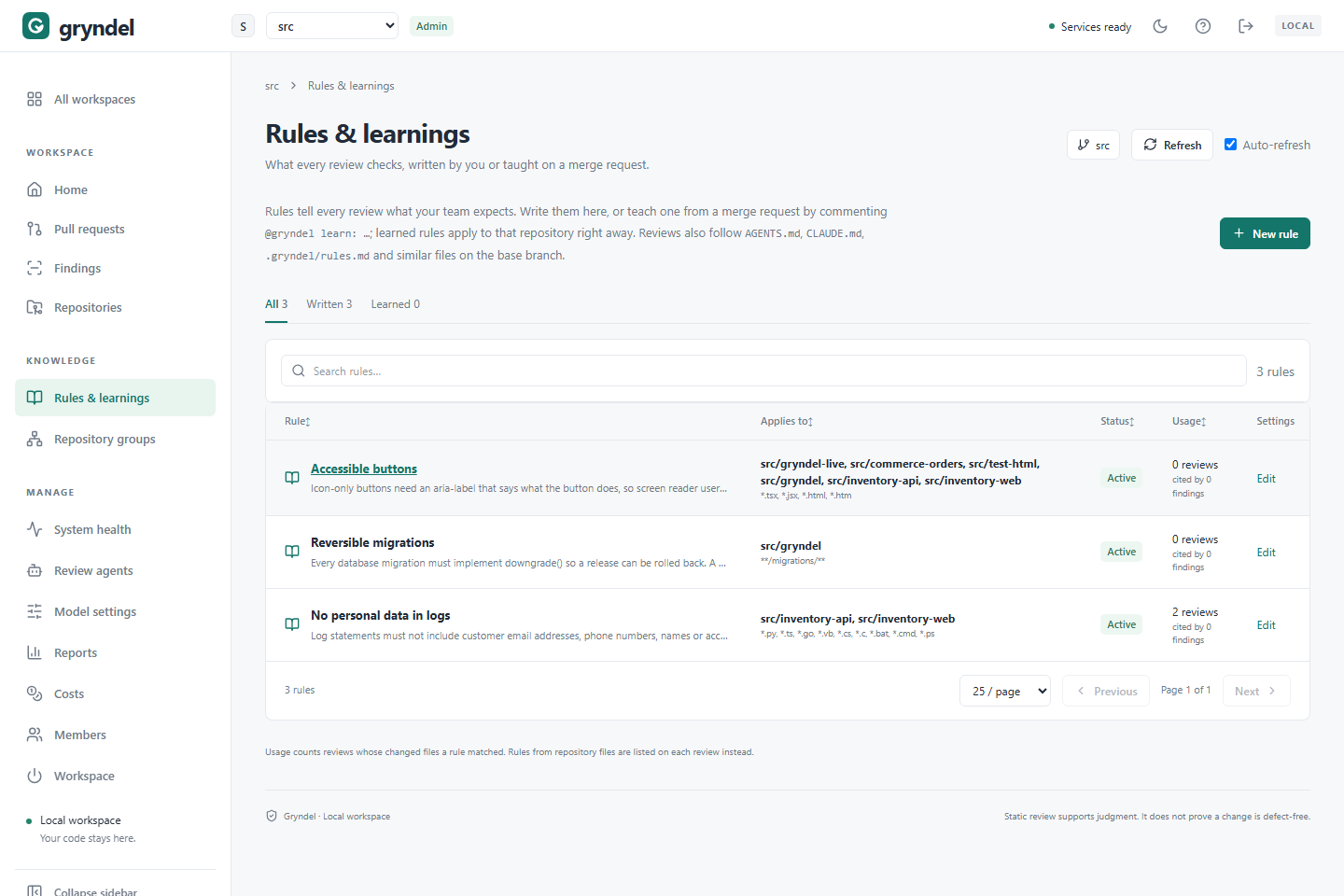
In the sidebar, under KNOWLEDGE, click Rules & learnings.
Everyone in the workspace can see the rules. Only workspace admins can add, change or delete them; viewers see Viewers cannot change rules. and can open a rule with View.
The tabs above the table narrow the list: All, Written (added on this page) and
Learned (taught with @gryndel learn:). Search rules filters by title, text,
repository, file pattern, or "active" and "off".
| Column | What it shows |
|---|---|
| Rule | The title and text. Learned rules carry a Learned badge. |
| Applies to | The repositories (or All repositories) and file patterns (or All files). |
| Status | Active or Off. |
| Usage | How many reviews the rule applied to, and how many posted findings cited it. |
| Settings | Edit for admins, View for viewers. |
Usage is your best clue to whether a rule earns its place. See Check that a rule works.
Write a rule that works
Gryndel gives each rule's text to the AI model as an instruction, word for word. The model can only follow what it can recognise in the changed code. So:
- Say exactly what to look for. Name the code, file or pattern.
- Say why. The model applies a rule better, and explains its finding better, when it knows the reason.
- Show an example if the rule is about a pattern. A short "do this, not that" works well.
- Keep one concern per rule. Two concerns make the rule harder to apply and harder to switch off on its own.
- Narrow it with file patterns so it only appears in reviews where it's relevant.
| Weak | Better |
|---|---|
| "Be careful with logging." | "Log messages must not include customer email addresses, phone numbers or access tokens, because logs are shipped to a third-party service. Log the customer ID instead." |
| "Write tests." | "Every new HTTP endpoint in services/**/api/ needs at least one integration test under tests/integration/ that calls it. Unit tests alone don't count." |
| "Follow our migration guidelines." | "Each Alembic migration must implement downgrade() so it can be rolled back. A downgrade() that only contains pass breaks this rule." |
Severity hint
Severity hint (None, Low, Medium or High) tells the model how much a violation matters. It's a hint, not a setting: the model still chooses the finding's severity, from P0 (most serious) to P2. A rule finding is labelled a convention finding, not a bug. Whether it fails the commit status depends on its severity and the repository's threshold (see Repositories).
Limits
| Limit | |
|---|---|
| Title | 100 characters |
| Rule text | 2,000 characters |
| File patterns per rule | 30 |
| Rules used in one review | 200 |
Add a rule
Before you start: you need to be a workspace admin.
- Click New rule. A side panel opens.
- Title: a short name you'll recognise in the list and in Gryndel's comments, such as "No PII in logs".
- Rule: what to check and why. See Write a rule that works.
- Files (optional): limit the rule to some files. See File patterns. Leave it blank for every file.
- Repositories (optional): tick the repositories it's for. Leave all unticked for every repository in the workspace. Only enrolled repositories are listed.
- Severity hint (optional).
- Leave Active in reviews ticked, and click Add rule.
What happens next
- The rule applies to reviews that start from now on. Each review keeps the rules in force when it was queued, so a review already waiting or running won't pick it up.
- To apply it to an open merge or pull request right away, comment
@gryndel reviewon it. - The rule is only included in a review when the merge or pull request changes at least one file that matches its file patterns.
File patterns
The Files field takes a comma-separated list. Each item is a file extension or a path pattern:
| You type | It matches | Doesn't match |
|---|---|---|
py (an extension) | Every .py file, in any folder | .pyi files |
*.test.ts (no /) | Files with that name pattern, in any folder | |
migrations/** (with /) | Everything under migrations/ at the top of the repository | db/migrations/0001.py |
**/migrations/** | Everything under any folder named migrations | |
web/*.tsx | .tsx files anywhere under web/, at any depth |
Patterns are case-sensitive. A pattern without a / is matched against the file name
only, wherever the file is. A pattern with a / is matched against the whole path from
the top of the repository. Start it with **/ to match at any depth.
Check that a rule works
After adding a rule, check it on a merge or pull request rather than waiting for a real violation.
- Open a test merge or pull request (a draft works) that clearly breaks the rule, in a repository and file the rule applies to.
- When the review finishes, look for a finding whose comment ends with a Rule: line naming your rule. See Reading a review.
- In Gryndel, open the review on Pull requests. Its details list every rule and guideline file the review used.
- Back on this page, the rule's Usage has gone up.
If the rule didn't fire, check these in order:
| Check | Fix |
|---|---|
| Is it Active? | Edit it and tick Active in reviews. |
| Is the repository included? | Under Repositories, tick it, or untick all for every repository. |
| Does a changed file match Files? | Check the pattern against File patterns. A pattern with / starts at the top of the repository. |
| Was the review queued before you saved? | Comment @gryndel review to review again. |
| Did the review list the rule, but report nothing? | The model didn't see a violation. Make the rule more specific, add an example, or check your test really breaks it. |
| Was the finding withheld? | In Verified mode a second pass checks every finding. Open the review's Withheld tab to see whether yours was rejected, and why. |
A rule that applies to many reviews but is never cited is either working (nobody breaks it) or too vague to act on. Read a few reviews to tell which.
Change, turn off or delete a rule
- Click the rule's title or Edit. A side panel opens.
- Change any field and click Save rule. Changes apply to reviews that start afterwards.
- Turn a rule off (untick Active in reviews) when it's temporarily wrong, for example during a migration that breaks it on purpose. It keeps its text and usage history, and its status becomes Off.
- Delete it (Delete in the panel, then confirm) when it no longer applies. This can't be undone.
If you close the panel with unsaved changes, Gryndel asks before discarding them.
Teach a rule from a merge request
When: you're reviewing a merge or pull request and notice something the team always wants, but Gryndel didn't flag. Teaching it there takes seconds and you don't need Gryndel admin rights.
How: comment on the merge request in GitLab, or the pull request in GitHub:
@gryndel learn: Log messages must not include customer email addresses, because logs are shipped to a third-party service.
Who can: people with the Developer role or higher on the project in GitLab, or with write access to the repository in GitHub. Anyone else gets a reply saying the command needs that access.
Gryndel is a GitHub App, which can't be @-mentioned: GitHub won't suggest @gryndel as you
type, and nobody is notified. Type it in full at the start of the comment. Your operator can
change the word Gryndel listens for; it's usually @gryndel.
What happens:
- Gryndel replies to confirm, quoting the rule.
- The text becomes an active rule for that repository only, straight away. Its title is the first line of your text, and it has no file patterns and no severity hint.
- The rule is stored in Gryndel. Nothing is committed to the repository and no merge or pull request is opened, on either host.
- It appears on this page under Learned. Its panel says Learned from a comment on !42
by @someone (
#42on GitHub), with a link back to the comment. - Each comment is learned once, even if GitLab or GitHub delivers it twice. Posting the same text in a new comment adds a second rule, so fix a learned rule on this page instead.
Afterwards: an admin can open the learned rule here to add file patterns, a severity hint, or more repositories, or turn it off. Write the comment as you'd write a rule: specific, with the reason. See Write a rule that works.
Keep rules in the repository
Guideline files
When: your conventions belong with the code. They change through merge or pull requests, get reviewed like code, and are also read by other AI coding tools your team uses.
If any of these files exist, every review reads them:
.gryndel/rules.md, for Gryndel only;AGENTS.md,CLAUDE.md,GEMINI.md,.cursorrules,.windsurfrulesand.github/copilot-instructions.md, which other AI tools read too.
Up to 20,000 characters of each file are used, and 40,000 in total.
They are read from the base branch, the branch the merge or pull request will merge into, never from the change itself. This is deliberate: a change can't alter the instructions it's reviewed with, so nobody can slip in "ignore problems in this file". To change a guideline:
- Edit the file in a merge or pull request and merge it.
- Reviews of merge or pull requests that target that branch use the new text from then on.
A repository profile (.gryndel/profile.md), written by
Learn a repository, is read the same way once merged.
rules: in .gryndel.yaml
When: you want structured rules (with file patterns and a severity) versioned in the repository, or the same rules for every repository in a GitLab group or GitHub account.
Add them to .gryndel.yaml at the top of the repository:
rules:
  - id: tests-required
    rule: Every new HTTP endpoint needs an integration test under tests/integration/.
    scope: ["services/**"]
    severity: medium
| Key | Meaning |
|---|---|
id | A short, unique name: lowercase letters, digits and -. |
rule | What to check, and why. |
scope | Optional file patterns, as in the Files field. |
severity | Optional hint: low, medium or high. |
For many repositories at once, keep the rules in a shared repository named
gryndel-config (the usual name; your operator can change it). Put a .gryndel.yaml on
its default branch. A .gryndel/rules.md there is used as a guideline file for every
repository it covers. Where it lives differs by host:
- GitLab
- GitHub
Create a project named gryndel-config in the group, such as company/gryndel-config. It
applies to every project in that group and its subgroups. Subgroups can have their own
gryndel-config too; Gryndel reads them from the top group down.
Create a repository named gryndel-config in the organisation or personal account, such as
acme/gryndel-config, and add it to Gryndel's GitHub App installation (the account's
Settings → Applications or GitHub Apps → Configure → Repository
access). Gryndel can only read repositories the App is installed on; without access, the
file is silently not used. It applies to every repository of that account. GitHub accounts
don't nest, so there is just this one level above the repository.
See How settings combine.
Switching off an inherited rule. If a shared rule doesn't suit one repository, list its
id under disabled_rules in that repository's .gryndel.yaml:
disabled_rules: [tests-required]
Same id in two places? A rule in the repository's files replaces a rule with the same id from this page.
Keys Gryndel doesn't understand are skipped and reported, and the review still runs. To see
the rules a repository will get, open it in Repositories, click
Configure, then Effective configuration and Preview. You can also comment
@gryndel configuration on a merge or pull request.
Recipes
Copy and adapt these.
No personal data in logs: files py, ts, go, severity High.
Log statements must not include customer email addresses, phone numbers, names or access tokens, because logs are shipped to a third-party service. Log the customer ID instead.
Reversible migrations: files **/migrations/**, severity Medium.
Every database migration must implement
downgrade()so a release can be rolled back. Adowngrade()that only containspassor raisesNotImplementedErrorbreaks this rule.
Integration tests for endpoints: files services/**, severity Medium.
A change that adds an HTTP endpoint must add at least one integration test under
tests/integration/that calls it. Unit tests alone don't count.
Accessible buttons: files tsx, jsx, severity Low.
Icon-only buttons need an
aria-labelthat says what the button does, so screen reader users can use them.